How to Find Orphan Pages in SEO and Fix Them Step by Step

Finding orphan pages is an important part of maintaining a healthy website. Even if a page contains valuable content, search engines may struggle to discover it when no internal links point to it. As a result, those pages can receive little or no organic traffic, waste crawl resources, and fail to contribute to your website's overall SEO performance.
Google explains that its crawlers primarily discover new pages by following links from pages it already knows about, making internal linking one of the most reliable ways to help Google find and understand your content. Likewise, SEO research from Ahrefs highlights that orphan pages are difficult to crawl because they lack internal connections, making them less likely to perform well in search results.
If you've ever wondered what is an orphan page, how to find orphan pages, or how to fix orphan pages without affecting your existing SEO performance, this guide will walk you through the complete process. You'll learn how to identify orphan pages using proven SEO methods, understand why they occur, fix them with the right internal linking strategy, and prevent them from appearing again as your website grows.
By the end of this guide, you'll have a practical workflow for finding orphan pages in SEO and improving your website's crawlability, indexing, and long-term organic visibility.
Key Takeaways
- Learn how to identify orphan pages before they impact your website's SEO.
- Understand why orphan pages reduce crawlability, visibility, and content performance.
- Follow a step-by-step process to find, fix, and manage orphan pages effectively.
- Discover practical internal linking strategies that strengthen your website structure.
- Build a long-term SEO maintenance process to prevent orphan pages and support sustainable organic growth.
What Is an Orphan Page in SEO?

An orphan page in SEO is a web page that exists on your website but has no internal links pointing to it from other indexable pages. Because search engines primarily discover new content by following links, an orphan page can become difficult for crawlers to find, even if it contains valuable information or is listed in an XML sitemap.
Think of your website as a connected network. Every important page should be reachable through navigation, category pages, related content, or contextual internal links. When a page is disconnected from that network, it becomes an orphan web page, making it harder for both users and search engines to discover naturally.
It's important to understand that an orphan page is not necessarily a broken page or a page that isn't indexed. Some orphan pages may still appear in search results because search engines discovered them through XML sitemaps, external backlinks, or previous crawls. However, without internal links, these pages often receive less crawl attention, pass little or no internal link equity, and are more likely to be overlooked during future crawls.
For example, imagine you publish a blog post but never link to it from your blog category, homepage, or related articles. Although the page is live, it remains isolated within your website's structure. Over time, this can reduce its visibility and limit its ability to contribute to your overall SEO performance.
Google recommends building a logical internal linking structure so crawlers can efficiently discover and understand your content. According to Google Search Central, search engines primarily find new pages by following links from pages they already know, making internal links one of the most reliable discovery signals.
Why Do Orphan Pages Hurt Your SEO?

Finding orphan pages is only the first step. The real problem begins when those pages remain disconnected from your website for months or even years. They often contain valuable content, but because they aren't integrated into your internal linking structure, they contribute very little to your overall SEO growth.
Here are the biggest ways orphan pages can affect your website's search performance.
1. Valuable Content Stops Contributing to Organic Growth
Every page you publish requires time to research, write, optimize, and maintain. When that page becomes orphaned, much of that investment is wasted because it receives very little visibility from either users or search engines.
Instead of supporting your content strategy, the page sits outside your website's natural content ecosystem.
Over time, dozens of orphan pages can accumulate across a growing website, creating content that exists but delivers little business value.
2. Your Topic Clusters Become Incomplete
Google increasingly evaluates websites based on topical depth rather than isolated pages.
For example, if your website covers technical SEO, every related article should strengthen the topic through logical internal links.
When an important guide becomes orphaned, search engines lose contextual signals that connect related content together. This weakens the overall topic cluster and can reduce the authority of every page within it, not just the orphan page itself.
3. Important Pages May Never Reach Their Ranking Potential
Ranking isn't determined only by keywords and backlinks.
Search engines also evaluate how important a page appears within your own website.
Pages that receive relevant internal links from category pages, guides, resources, and related articles generally send stronger signals than pages that exist in isolation.
An orphan page may still be indexed, but it often struggles to compete with similar content that is fully integrated into the site's architecture.
4. Website Maintenance Becomes More Difficult
One hidden problem with orphan pages is that they are easy to forget.
Because they don't appear in navigation menus, category archives, or related content, they are less likely to be reviewed during routine SEO updates.
This increases the chances that the page will contain:
- outdated information
- old statistics
- expired offers
- broken internal links
- obsolete recommendations
As your website grows, maintaining hidden content becomes increasingly difficult without regular technical audits.
5. User Journeys Become Disconnected
A well-optimized website guides visitors from one helpful resource to another.
For example:
Guide → Checklist → Tool → Case Study → Service
This journey improves engagement and helps users discover more relevant content.
Orphan pages interrupt that experience because visitors have no natural pathway to reach them while exploring your website.
Even high-quality content cannot support conversions if users never discover it.
6. SEO Decisions Become Less Reliable
Many website owners evaluate content performance using traffic, rankings, and engagement metrics.
However, orphan pages often receive very little exposure, making it difficult to determine whether the content itself is weak or simply undiscoverable.
This can lead to unnecessary rewrites or content removal when the real issue is a lack of internal connections.
Before deciding to update or delete a page, it's worth checking whether it has become orphaned.
Why Every Important Page Should Be Connected
A strong website isn't built from individual pages; it's built from pages that support one another.
When every valuable article, landing page, or resource is connected through meaningful internal links, search engines gain a clearer understanding of your website, users discover more relevant content, and your SEO efforts work together instead of in isolation.
Regularly reviewing your website with a Site Audit, checking your Internal Link Analyzer, and comparing crawl data with your sitemap helps ensure that important pages remain part of your website's overall SEO strategy rather than becoming forgotten assets.
How to Find Orphan Pages: A Step-by-Step Process
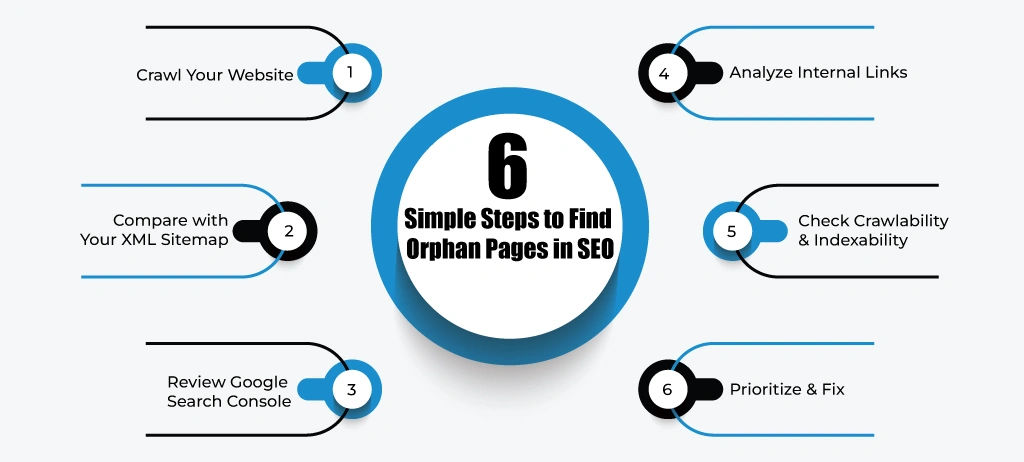
Finding orphan pages requires more than running a single website crawl. Since these pages don't receive internal links, many SEO crawlers cannot discover them on their own. The most effective approach is to compare multiple data sources to identify URLs that exist on your website but are disconnected from your internal linking structure.
The following workflow is commonly used by SEO professionals during technical audits because it provides a complete view of your website's crawlability and content structure.
Step #1: Crawl Your Website
Start by crawling your website with a technical SEO crawler to collect all pages that are accessible through internal links. This crawl creates the baseline for your analysis because it shows the pages that search engines and users can normally discover through your website's navigation and internal linking.
During the crawl, export the list of discovered URLs and review information such as status codes, canonical tags, indexability, and internal link counts. These reports will later help you compare accessible pages with pages that exist elsewhere on your website.
If you're managing a growing website, running a Site Audit regularly makes it easier to monitor changes in your site structure and identify pages that may require further investigation.
Step #2: Compare the Crawl with Your XML Sitemap
Your XML sitemap often contains URLs that may not appear during a website crawl. Compare the sitemap against your crawl results to identify pages that exist in the sitemap but aren't connected through internal links.
These URLs aren't always orphan pages, but they should be reviewed carefully because they may indicate missing navigation paths or incomplete internal linking.
At this stage, an XML Sitemap Checker can help verify whether your sitemap includes outdated, redirected, or isolated pages that require attention.
Step #3: Review Google Search Console Data
Google Search Console provides another valuable source of information because it shows the URLs Google has already discovered through crawling, sitemaps, or external references.
Compare Search Console's indexed pages with your crawl results. If Google knows about a page that isn't reachable through your internal links, it deserves a closer inspection.
This comparison also helps identify older content that remains indexed even though it has become disconnected from the rest of your website.
Step #4: Analyze Your Internal Linking Structure
Once you've identified candidate URLs, review how they connect to the rest of your website.
Ask questions such as:
- Does this page receive links from related articles?
- Is it included in category or hub pages?
- Can users reach it through your navigation?
- Does it support an existing content cluster?
If the answer is "no," you've likely found an orphan page.
An Internal Link Analyzer makes this process much faster by highlighting pages with few or no incoming internal links, allowing you to prioritize improvements without manually reviewing hundreds of URLs.
Step 5: Verify Crawlability and Indexability
Not every isolated page should be fixed immediately.
Before making changes, confirm that the page:
- Returns a 200 OK status.
- Is allowed in the robots.txt file.
- Doesn't contain an unintended noindex directive.
- Uses the correct canonical tag.
- Represents valuable content worth keeping.
Some pages are intentionally isolated, such as thank-you pages, private resources, or temporary landing pages. These don't usually require additional internal links.
Running a Crawlability Checker and Indexability Checker alongside your audit helps confirm whether the page should remain part of your searchable content.
Step 6: Create a Prioritized Action List
After completing your analysis, group orphan pages based on their importance.
Prioritize pages that:
- Generate conversions.
- Target valuable keywords.
- Receive backlinks.
- Support important topic clusters.
- Attract organic traffic.
Lower-priority pages, outdated content, or duplicate resources can then be updated, merged, redirected, or removed as part of your content maintenance strategy.
This structured approach allows you to find orphan pages efficiently while ensuring your efforts focus on content that has the greatest impact on your website's long-term SEO performance.
How to Fix Orphan Pages Without Losing SEO Value

Finding orphan pages is only half the job. The next step is deciding how to fix them without affecting your existing rankings, traffic, or website structure. Not every orphan page should be treated the same way. Some deserve stronger internal visibility, while others may be outdated or no longer provide value.
Instead of adding internal links blindly, evaluate the purpose and performance of each page before making changes. This approach protects your existing SEO efforts while improving your website's overall architecture.
1. Decide Whether the Page Still Deserves to Exist
Before making any changes, ask whether the page is still useful.
Review factors such as the following:
- Organic traffic
- Keyword rankings
- Backlinks
- Conversions
- Content quality
- Business relevance
If the page no longer supports your users or business goals, adding internal links may not be the best solution. In many cases, updating, consolidating, or removing low-value content creates a stronger website than simply reconnecting every orphan page.
2. Add Contextual Internal Links From Relevant Content
If the page contains valuable information, the most effective solution is to add contextual internal links from closely related pages.
Rather than placing random links in navigation or footers, connect the orphan page from articles, guides, or category pages that discuss similar topics.
For example, if you publish a guide about technical SEO audits, linking to a detailed resource on orphan pages provides additional value for readers while helping search engines understand the relationship between both pages.
An Internal Link Analyzer can quickly identify relevant pages that already cover similar topics, making it easier to build meaningful internal connections.
3. Include the Page in Your Website Structure
Important pages should be easy for both users and search engines to discover.
Depending on the page type, consider adding it to:
- Category pages
- Resource hubs
- Topic clusters
- Related article sections
- Knowledge bases
- HTML sitemaps
The goal isn't to increase the number of links—it's to ensure the page naturally fits within your website's information architecture.
4. Update Outdated Content Before Reconnecting It
Connecting outdated pages through new internal links can spread obsolete information across your website.
Before reintegrating an orphan page, review:
- Statistics
- Examples
- Screenshots
- SEO recommendations
- External references
Refreshing the content first ensures you're directing users to accurate and valuable information instead of outdated resources.
5. Merge Similar Pages That Compete With Each Other
Sometimes orphan pages exist because similar articles have been published multiple times over the years.
If two or more pages target nearly identical topics, consider merging them into one comprehensive resource instead of maintaining several weaker pages.
After consolidation:
- Redirect the retired URLs.
- Update internal links.
- Strengthen the remaining page with the best content from all versions.
This reduces duplicate content while concentrating authority on a single page.
6. Redirect Pages That No Longer Have SEO Value
If an orphan page is outdated, receives no meaningful traffic, and no longer serves a business purpose, a 301 redirect may be the better solution.
Redirect the URL to the most relevant alternative rather than leaving unnecessary pages on your website.
Avoid redirecting unrelated pages simply to preserve URLs. Every redirect should improve the user experience and maintain topical relevance.
7. Verify the Fix Before Publishing
After reconnecting or updating orphan pages, perform one final technical review.
Confirm that the page:
- Receives internal links from relevant pages.
- Returns the correct HTTP status.
- Uses the appropriate canonical tag.
- Remains crawlable.
- Can be indexed.
- Appears in your XML sitemap if appropriate.
Running a website audit tool after implementation helps verify that the page is no longer isolated and that your internal linking improvements have been applied correctly.
Build Connections, Not Just Links
Fixing orphan pages is about more than adding another internal link. Every important page should support your website's overall content strategy by connecting naturally to related topics and helping users move through your site with ease.
When orphan pages become part of a logical content structure, they contribute more effectively to topical authority, improve content discovery, and strengthen your website's long-term organic performance.
Internal Linking Best Practices to Prevent Orphan Pages?

The easiest way to fix orphan pages is to prevent them from happening in the first place. A well-planned internal linking strategy ensures that every important page becomes part of your website's content ecosystem from the moment it is published. Instead of treating internal linking as an afterthought, make it a standard step in your content publishing workflow.
Here are the best practices SEO professionals use to keep websites well-connected and orphan-page free.
1. Plan Internal Links Before Publishing New Content
Every new page should have a clear place within your website before it goes live.
Ask yourself:
- Which existing pages should link to this content?
- Which future articles can reference it?
- Does it belong to an existing category or topic cluster?
Planning these connections in advance helps ensure that new pages are immediately discoverable by both users and search engines instead of becoming isolated over time.
2. Build Content Around Topic Clusters
Rather than publishing standalone articles, organize your content into related topic clusters.
For example, a Technical SEO cluster might include guides on:
- XML sitemaps
- Robots.txt
- Canonical tags
- Crawlability
- Internal linking
- Orphan pages
Each article should naturally reference other relevant resources within the same topic. This creates a logical website structure, strengthens topical authority, and makes it much less likely for valuable pages to become orphaned.
3. Use Contextual Internal Links Instead of Random Links
Not every internal link provides the same value.
The most effective links appear naturally within the content where they help readers explore a related topic in greater detail.
For example, while discussing website crawling, it's natural to guide readers to resources about Robots.txt, XML sitemaps, or crawlability. These contextual connections improve user experience while helping search engines understand the relationship between your pages.
An Internal Link Analyzer can help identify pages that should be connected based on topical relevance instead of relying on manual reviews.
4. Keep Navigation and Category Pages Updated
As your website grows, important pages should be reflected in your navigation structure where appropriate.
Review your:
- Category pages
- Resource hubs
- Learning centers
- Blog archives
- Product or feature pages
Adding new content to these sections helps distribute visibility across your website and reduces the risk of pages becoming disconnected after publication.
5. Review Internal Links During Every Content Update
Internal linking isn't a one-time task.
Whenever you update an existing article, look for opportunities to connect it with newer content that has been published since the original article went live.
This simple habit strengthens your website over time and ensures that older pages continue supporting newly published resources.
6. Monitor Your Website With Regular SEO Audits
Even well-maintained websites can develop orphan pages after redesigns, URL changes, content migrations, or navigation updates.
Scheduling regular technical audits helps you detect these issues before they affect your organic performance.
Running a Site Audit alongside an Internal Link Analyzer allows you to identify missing internal connections, review crawl paths, and maintain a healthy website structure as your content library expands.
Make Internal Linking Part of Your SEO Workflow
Strong internal linking isn't just about helping search engines crawl your website; it creates a better experience for users by guiding them to the next relevant resource.
When every new page is connected through meaningful, topic-focused links, your content becomes easier to discover, easier to maintain, and more likely to support long-term organic growth. A consistent internal linking process is one of the most effective ways to prevent orphan pages while strengthening the authority of your entire website.
How to Prevent Orphan Pages in the Future

Preventing orphan pages is much easier than fixing them later. As your website grows, new articles, landing pages, product pages, and resources are published regularly. Without a structured SEO workflow, it's easy for valuable content to become disconnected from the rest of your website over time.
The most effective approach is to make orphan page prevention part of your ongoing website maintenance rather than treating it as a one-time technical audit.
1. Create a Publishing Checklist for Every New Page
Every new page should follow the same publishing process before it goes live.
Your checklist should confirm that the page:
- Has at least two or three relevant internal links pointing to it.
- Is linked from an appropriate category, hub, or resource page.
- Uses the correct canonical URL.
- Can be crawled and indexed.
- Is included in your XML sitemap if it should appear in search results.
Following a standard checklist significantly reduces the chance of publishing pages that become isolated from the rest of your website.
2. Perform Regular Technical SEO Audits
Website structure changes constantly. New content is added, old pages are updated, and URLs may change during redesigns or migrations.
Scheduling regular technical SEO audits helps you detect structural issues before they begin affecting rankings or crawl efficiency.
A monthly Site Audit combined with an Internal Link Analyzer allows you to monitor internal linking patterns, identify newly isolated pages, and maintain a healthy website architecture as your content library expands.
3. Review Website Changes After Migrations or Redesigns
Website migrations are one of the most common causes of orphan pages.
Navigation menus, category pages, and internal links often change during redesigns, leaving older URLs disconnected even though the pages still exist.
After any migration, verify that:
- Important pages remain linked from relevant sections.
- Redirects work correctly.
- Navigation has been updated.
- Internal links point to the new URLs.
This review helps prevent valuable content from disappearing within the website structure.
4. Keep Your Content Hub Connected
As new articles are published, they should strengthen your existing content, not exist independently.
Review older guides and add links to newly published resources whenever they provide additional value for readers.
Likewise, every new article should reference relevant existing content where appropriate.
Maintaining these relationships creates stronger topic clusters, improves content discovery, and helps search engines understand the overall structure of your website.
5. Monitor Website Health Continuously
Preventing orphan pages isn't just about internal links. It's also about monitoring the overall health of your website.
Review your website regularly for:
- Crawlability issues
- Indexability problems
- Broken internal links
- XML sitemap accuracy
- Canonical inconsistencies
Monitoring these technical signals together makes it easier to identify structural issues before they affect search performance.
Make Prevention Part of Your SEO Process
Orphan pages usually appear because website maintenance processes are inconsistent, not because of a single technical mistake.
By combining structured publishing workflows, regular technical audits, ongoing internal link reviews, and continuous website monitoring, you can keep your content connected as your website grows.
A proactive approach not only helps prevent orphan pages but also creates a stronger website architecture that supports better crawling, indexing, and long-term organic growth.
How WRanker Helps You Find Orphan Pages Faster
Finding orphan pages manually often means switching between multiple tools, exporting reports, comparing XML sitemaps with crawl data, reviewing internal links, and validating technical SEO signals one step at a time. While this approach works, it can become time-consuming as your website grows.
WRanker simplifies this process by bringing several technical SEO insights together in one workflow. Instead of relying on disconnected reports, you can review your website structure, identify pages with weak internal connections, and investigate crawl or indexing issues from a centralized dashboard.
For a complete orphan page review, you can combine several WRanker tools to validate different parts of your website architecture:
- Use the Site Audit to uncover technical SEO issues across your website.
- Review your Internal Link Analyzer to identify pages receiving little or no internal link support.
- Compare discovered URLs with your XML Sitemap Checker to spot content that may exist outside your normal website structure.
- Verify accessibility with the Crawlability Checker and confirm important pages remain available for search engines to discover.
- Use the Indexability Checker to ensure valuable pages can actually appear in search results after reconnecting them.
Rather than depending on a single report, this combined workflow gives you a more complete picture of how your content is connected, helping you identify hidden opportunities to strengthen your website's architecture before they affect organic performance.
Whether you're managing a small business website or a large content library, regularly reviewing these technical signals makes it easier to keep important pages connected, improve content discoverability, and maintain a healthier SEO foundation as your website continues to grow.
Conclusion
Learning how to find orphan pages is an important part of maintaining a healthy website and a strong internal linking structure. By regularly auditing your content, connecting valuable pages through relevant internal links, and monitoring your website's technical health, you can improve crawlability, strengthen topical authority, and help search engines discover your most important content more efficiently.
Instead of treating orphan pages as a one-time issue, make them part of your ongoing SEO maintenance process. A consistent review of your website structure today can prevent hidden content problems and support better organic visibility as your website continues to grow.
Frequently Asked Questions
Which SEO tools help find orphan pages?
What is an orphan page in SEO?
How do you find orphan pages on a website?
Why are orphan pages bad for SEO?
Can orphan pages still appear in Google Search?
What causes orphan pages on a website?
How do you fix orphan pages without affecting SEO?
How often should you check for orphan pages?
What's the difference between an orphan page and a dead-end page?
Do XML sitemaps prevent orphan pages?
More Related Blogs: