Website Audit Report Checklist: What to Include in an SEO Audit

A Website Audit Report is the foundation of every successful SEO strategy. It helps you identify technical issues, on-page gaps, performance bottlenecks, and optimization opportunities before they affect your search rankings. Instead of guessing what's wrong, a well-structured audit provides clear, data-driven recommendations to improve your website's overall SEO health.
Google states that pages must be discoverable, crawlable, and indexable before they can rank in search results, making regular SEO audits essential for long-term organic growth.
Whether you're creating website audit reports for clients, performing a web page SEO audit, or using a free website audit tool, knowing what to include ensures your report is practical, actionable, and aligned with modern SEO best practices.
In this guide, you'll learn the essential components of a professional website audit report, a complete SEO audit checklist, common auditing mistakes to avoid, and how WRanker can simplify the entire website auditing process.
Key Takeaways
- A complete website audit helps uncover SEO, technical, content, and performance issues before they impact your organic traffic.
- Prioritizing high-impact fixes instead of addressing every warning at once leads to faster and more effective SEO improvements.
- Regular audits keep your website healthy by identifying new issues caused by updates, redesigns, or content changes.
- Combining technical insights with user-focused improvements creates a better browsing experience and stronger long-term search visibility.
- A structured audit process turns complex SEO data into clear actions, making it easier to improve website performance consistently.
What Is a Website Audit Report?

A Website Audit Report is a document that summarizes the overall SEO health of a website. It identifies technical, on-page, and structural issues that may affect search visibility and provides recommendations to improve website performance. Rather than focusing on a single problem, it gives you a complete picture of how your website is performing from an SEO perspective.
A professional SEO auditing report typically evaluates areas such as crawlability, indexability, internal linking, page speed, metadata, mobile usability, structured data, and website security. Organizing these findings into a report helps website owners and SEO teams understand which issues require immediate attention and which improvements can be planned over time.
Consider a website that continues to publish new pages but doesn't see any growth in organic traffic. A website audit might reveal that several pages are difficult for search engines to crawl, internal links don't connect important pages, or duplicate metadata confuses search engines. Without a structured audit, these issues often remain unnoticed because they aren't always visible during everyday website management.
A well-prepared Website Audit Report helps turn these findings into actionable tasks. It creates a clear plan for improving website quality, making it easier to prioritize fixes, monitor progress, and maintain a website that is easier for both users and search engines to navigate.
If you're performing a web page SEO audit, one practical approach is to review each area individually, starting with technical SEO, then evaluating content quality, internal links, page performance, and security. Breaking the audit into smaller sections makes the process more manageable and helps ensure that no important issue is overlooked.
Why Is an SEO Audit Report Important?
An SEO Audit Report helps you understand why a website is performing the way it is in search results. Instead of making SEO decisions based on assumptions, it provides a clear picture of the issues affecting your website and identifies the improvements that will have the greatest impact on organic visibility.
Search engines continuously evaluate websites for crawlability, content quality, page experience, and technical health. Even small issues—such as broken internal links, slow-loading pages, duplicate metadata, or incorrect redirects can gradually reduce your website's ability to rank. A structured audit report brings these issues together, making it easier to prioritize fixes before they affect traffic and conversions.
For example, imagine your website starts losing organic traffic after a redesign. At first glance, everything appears to work normally. However, an SEO audit may reveal that important pages are returning redirects, internal links have been removed, or search engines can no longer crawl parts of the site. Without a proper audit report, these problems can remain unnoticed for weeks or even months.
A well-prepared Website Audit Report also improves collaboration between SEO specialists, developers, content teams, and business stakeholders. Instead of sharing a list of isolated issues, the report explains what each issue is, why it matters, and how resolving it contributes to better website performance. This makes implementation more organized and helps everyone work toward the same SEO goals.
Regular audits are equally valuable for maintaining long-term website health. As new pages are published, designs change, or search engine algorithms evolve, fresh technical and content issues can appear. Reviewing your website periodically helps identify these changes early, ensuring your SEO strategy continues to support sustainable organic growth.
If your goal is to audit a website for SEO, an audit report should not only highlight problems but also provide a practical roadmap for improving crawlability, user experience, and overall search performance. It becomes a working document that guides future optimization rather than simply recording existing issues.
What Should Every Website Audit Report Include?
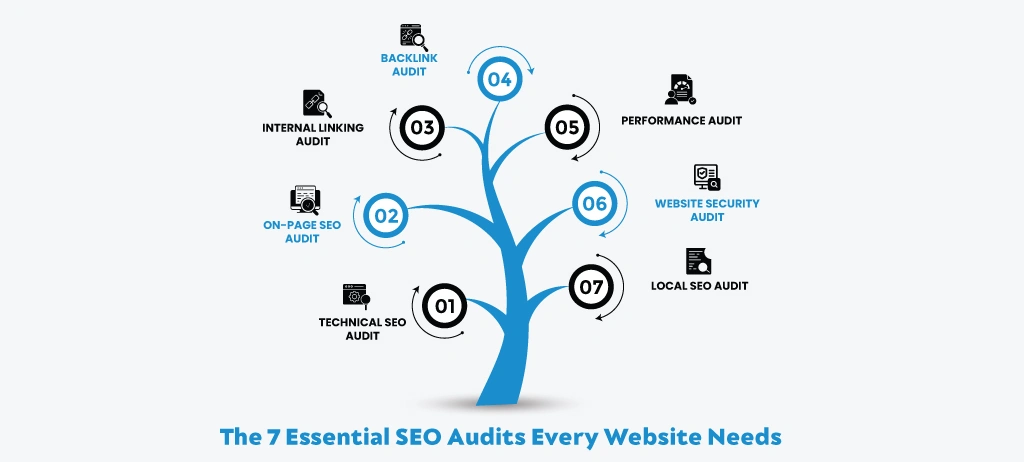
A Website Audit Report should provide a complete picture of your website's SEO health rather than focusing on a single issue. Search performance depends on many factors working together, from technical setup and content optimization to internal linking, website performance, and security. If one area is overlooked, it can limit the effectiveness of your overall SEO efforts.
A well-structured audit organizes these findings into separate sections, making it easier to understand the issues, prioritize improvements, and create a practical action plan. This approach also helps website owners, SEO professionals, and developers focus on the changes that will have the greatest impact on search visibility and user experience.
The following sections cover the essential components that every professional Website Audit Report should include and explain why each one plays an important role in building and maintaining a search-friendly website.
1: Technical SEO Audit
A Technical SEO Audit is the first step in any Website Audit Report because it determines whether search engines can access, crawl, understand, and index your website correctly. If technical issues exist, even well-optimized content may struggle to appear in search results because search engines can't evaluate it properly.
Many website owners assume that publishing quality content is enough to improve rankings. However, technical problems often prevent that content from reaching its full potential. A page may be informative and optimized, but if it returns crawl errors, loads too slowly, contains broken redirects, or is accidentally blocked from indexing, search engines may never rank it for the keywords you're targeting.
For example, imagine you've published a new service page and shared it with your customers, but weeks later it still isn't receiving organic traffic. A technical audit might reveal that the page isn't included in your XML sitemap, has a noindex directive, or is blocked by the robots.txt file. These issues are rarely visible during everyday website management, but they directly affect how search engines discover your content.
A comprehensive technical audit should review every factor that influences website accessibility and crawl efficiency. This includes:
- Crawl errors that prevent pages from being accessed
- XML sitemap accuracy and coverage
- Robots.txt configuration
- Canonical tag implementation
- Redirect chains and loops
- Broken links and server errors
- HTTPS implementation and mixed content
- Core Web Vitals and page loading performance
- Mobile usability
- Structured data validation
Each of these elements contributes to how efficiently search engines process your website. Ignoring just one of them can reduce crawl efficiency, waste crawl budget, or prevent valuable pages from being indexed correctly.
Another benefit of performing a technical audit is that it helps prioritize improvements. Instead of fixing random issues, you can identify which technical problems have the greatest impact on visibility. For example, resolving a sitewide redirect issue or fixing incorrect canonical tags usually delivers a greater SEO benefit than optimizing pages that search engines cannot crawl in the first place.
Because technical issues change as websites grow, they shouldn't be treated as a one-time task. New pages, plugin updates, website migrations, and design changes can introduce fresh problems without warning. Reviewing your website regularly helps ensure search engines continue to access your content efficiently while protecting the rankings you've already earned.
2: On-Page SEO Audit
An On-Page SEO Audit evaluates how well each page on your website is optimized for both search engines and users. While technical SEO ensures your website can be crawled and indexed, on-page SEO helps search engines understand what each page is about and whether it deserves to rank for a specific search query.
One of the most common reasons pages fail to rank isn't because of poor content; it's because the page doesn't clearly communicate its purpose. Missing headings, duplicate title tags, weak keyword targeting, poorly written meta descriptions, or content that doesn't satisfy search intent can all reduce a page's ability to compete in search results.
For example, imagine you've written a detailed article about keyword research, but the page title focuses on a different topic, the H1 doesn't include the primary keyword, and the content answers only part of the user's question. Even though the article contains useful information, search engines may struggle to determine its relevance, while users may leave the page without finding the answers they expected. An on-page audit helps identify these gaps before they affect rankings.
A complete on-page SEO audit should review every important page individually and examine factors such as the following:
- Whether the page targets one clear primary keyword
- Title tag and meta description optimization
- Heading hierarchy (H1–H6)
- Search intent alignment
- Content quality, depth, and originality
- Keyword placement and natural usage
- Internal linking opportunities
- Image optimization, including descriptive alt text
- URL structure and readability
- Duplicate or thin content
However, checking these elements isn't enough. The audit should also determine whether the page actually solves the user's problem. Search engines increasingly reward content that demonstrates expertise, answers questions completely, and provides a satisfying experience. A page that is technically optimized but offers little value is unlikely to perform well over time.
Another common issue discovered during an on-page audit is keyword cannibalization. This happens when multiple pages target the same keyword, making it difficult for search engines to understand which page should rank. Reviewing keyword targeting across your website helps ensure every important page has a unique purpose and supports your overall content strategy.
An effective Website Audit Report doesn't simply highlight missing metadata or suggest adding more keywords. It evaluates whether each page meets the expectations of both users and search engines. Improving page relevance, content quality, and user experience often leads to stronger rankings, higher click-through rates, and better engagement.
As your website grows, on-page optimization should become an ongoing process rather than a one-time task. Updating existing content, improving metadata, strengthening internal links, and refining pages based on user behavior help keep your website competitive as search trends and algorithms evolve.
3: Internal Linking Audit
An Internal Linking Audit evaluates how pages on your website are connected. While internal links help users navigate your website, they also guide search engines toward your most important pages and help them understand the relationship between different topics. A weak internal linking structure can leave valuable content difficult to discover, even if it is fully optimized.
Many websites gradually develop internal linking issues as they grow. New blog posts are published without linking to existing content, old pages are removed without updating references, and important landing pages become buried several clicks away from the homepage. Over time, these problems make it harder for both users and search engines to navigate the website efficiently.
For example, imagine you've published a comprehensive guide that answers a high-value search query. Although the content is well-written and technically optimized, it receives very little organic traffic. During an internal linking audit, you discover that no other page on the website links to it. As a result, search engines have fewer pathways to discover the page, and users are unlikely to find it while browsing related content. Adding relevant contextual internal links from authoritative pages can significantly improve its visibility and strengthen its topical relevance.
A thorough internal linking audit should review the following:
- Orphan pages that have no incoming internal links.
- Broken internal links leading to 404 pages.
- Pages with very few internal links.
- Anchor text relevance and consistency.
- Link depth from the homepage.
- Opportunities to connect related content clusters.
- Links pointing to redirected or outdated URLs.
The audit should also examine whether internal links genuinely help users. Simply adding more links isn't enough—each link should guide readers to the next logical piece of information. For example, a page discussing technical SEO should naturally connect to related topics such as crawlability, XML sitemaps, robots.txt, or Core Web Vitals. This creates a better user journey while helping search engines understand the topical relationship between your pages.
Another important objective of an internal linking audit is identifying orphan pages and keyword cannibalization. A page with no internal links may never receive the authority it deserves, while multiple pages targeting the same topic without a clear linking hierarchy can confuse search engines about which page should rank.
Regularly reviewing your internal linking structure keeps your website organized as new pages are added. It distributes link equity more effectively, improves content discovery, supports topical authority, and encourages visitors to explore more pages during a single session, all of which contribute to stronger long-term SEO performance.
4: Backlink Audit
A Performance Audit measures how quickly, smoothly, and reliably your website works for visitors across different devices and internet connections. Website speed is no longer just a user experience factor—it directly influences how people interact with your pages and how search engines evaluate their quality.
A slow website can affect every stage of the customer journey. Visitors may leave before the page finishes loading, abandon forms, or stop browsing after viewing only one page. Even if your content is valuable, poor performance can prevent users from reaching it.
For example, imagine someone searches for a product or service on their mobile phone and clicks your website. If the page takes several seconds to load or important elements keep shifting while loading, many users will return to the search results and choose another website. Over time, this behavior can reduce engagement and make it more difficult to maintain strong organic performance.
A comprehensive performance audit should evaluate:
- Page loading speed across desktop and mobile devices.
- Core Web Vitals, including Largest Contentful Paint (LCP), Interaction to Next Paint (INP), and Cumulative Layout Shift (CLS).
- Large images that increase page weight.
- Render-blocking CSS and JavaScript.
- Server response time.
- Browser caching and file compression.
- Unused code and unnecessary third-party scripts.
However, improving performance isn't only about achieving better speed scores. The objective is to create a website that loads quickly, responds smoothly to user interactions, and provides a consistent experience regardless of the device being used.
A performance audit also helps uncover issues that gradually develop as a website grows. Adding new plugins, large media files, tracking scripts, or interactive features can increase loading times without being immediately noticeable. Regular audits allow these issues to be identified before they begin affecting user experience and organic traffic.
When performance improvements are made consistently, websites often benefit from longer session durations, lower bounce rates, and a better overall browsing experience. More importantly, visitors can access information faster, making it easier for them to complete the actions that matter, whether that's reading an article, submitting a form, or making a purchase.
5: Performance Audit
A Performance Audit measures how quickly, smoothly, and reliably your website works for visitors across different devices and internet connections. Website speed is no longer just a user experience factor—it directly influences how people interact with your pages and how search engines evaluate their quality.
A slow website can affect every stage of the customer journey. Visitors may leave before the page finishes loading, abandon forms, or stop browsing after viewing only one page. Even if your content is valuable, poor performance can prevent users from reaching it.
For example, imagine someone searches for a product or service on their mobile phone and clicks your website. If the page takes several seconds to load or important elements keep shifting while loading, many users will return to the search results and choose another website. Over time, this behavior can reduce engagement and make it more difficult to maintain strong organic performance.
A comprehensive performance audit should evaluate:
- Page loading speed across desktop and mobile devices.
- Core Web Vitals, including Largest Contentful Paint (LCP), Interaction to Next Paint (INP), and Cumulative Layout Shift (CLS).
- Large images that increase page weight.
- Render-blocking CSS and JavaScript.
- Server response time.
- Browser caching and file compression.
- Unused code and unnecessary third-party scripts.
However, improving performance isn't only about achieving better speed scores. The objective is to create a website that loads quickly, responds smoothly to user interactions, and provides a consistent experience regardless of the device being used.
A performance audit also helps uncover issues that gradually develop as a website grows. Adding new plugins, large media files, tracking scripts, or interactive features can increase loading times without being immediately noticeable. Regular audits allow these issues to be identified before they begin affecting user experience and organic traffic.
Google identifies Core Web Vitals as key metrics for measuring real-world page experience. Websites that provide faster loading times, stable layouts, and responsive interactions create a better experience for users and are better positioned to meet modern search performance expectations.
When performance improvements are made consistently, websites often benefit from longer session durations, lower bounce rates, and a better overall browsing experience. More importantly, visitors can access information faster, making it easier for them to complete the actions that matter—whether that's reading an article, submitting a form, or making a purchase.
6: Security Audit
A security audit evaluates whether your website is protected against issues that could affect user trust, website availability, and search engine visibility. While security is often associated with protecting sensitive data, it also plays an important role in SEO. A compromised website can lose rankings, display browser security warnings, or even be removed from search results until the issues are resolved.
Many website owners assume their site is secure simply because it uses HTTPS. In reality, security involves much more than installing an SSL certificate. Outdated software, insecure HTTP resources, missing security headers, broken SSL configurations, and malware vulnerabilities can all expose a website to unnecessary risks.
For example, imagine a customer visits your website to submit an enquiry form. Instead of seeing a secure connection, their browser displays a "Not Secure" warning because some resources are still loading over HTTP. Most visitors will leave immediately, reducing trust in your business and potentially affecting conversions. A security audit helps identify and resolve these issues before they impact your users.
A comprehensive security audit should review:
- HTTPS implementation across the entire website.
- SSL certificate validity and configuration.
- Mixed content issues caused by insecure HTTP resources.
- Missing or incorrect security headers.
- Malware or suspicious files.
- Outdated CMS, themes, and plugins.
- Broken login security or weak authentication settings.
- Security-related crawl or indexing issues.
Regular security reviews are especially important after website migrations, plugin updates, or server changes. Small configuration errors introduced during these updates can create vulnerabilities that often go unnoticed until users or search engines detect them.
Beyond protecting your website, a security audit also helps maintain user confidence. Visitors are more likely to engage with a website when they know their information is transmitted securely and the browsing experience is free from security warnings. Search engines also encourage secure browsing by treating HTTPS as a ranking signal and by warning users before they access potentially unsafe websites.
By including a security review in your Website Audit Report, you can identify risks early, protect your website from avoidable issues, and maintain a secure environment for both users and search engines.
7: Local SEO Audit
A Local SEO Audit helps determine how well your business appears in location-based search results. If your website targets customers within a specific city, region, or service area, simply optimizing your website isn't enough. Search engines also evaluate your business information, local relevance, and online credibility before deciding where to rank you in local searches.
For example, imagine someone searches for "SEO agency near me" or "best digital marketing company in Jaipur." If your competitors have consistent business information, well-optimized Google Business Profiles, and strong local citations while your business details are incomplete or inconsistent, they are more likely to appear in the Local Pack even if your website content is better.
A comprehensive local SEO audit should review the following:
- Google Business Profile completeness and optimization.
- NAP (Name, Address, Phone Number) consistency across all platforms.
- Business categories and service information.
- Local citations and directory listings.
- Customer reviews and ratings.
- Location-specific landing pages.
- Local keyword targeting.
- Embedded Google Maps and contact details.
- Local schema markup implementation.
One of the most common local SEO problems is inconsistent business information across the web. For instance, if your business address is updated on your website but still displays the old address on business directories, search engines may struggle to verify which information is accurate. This inconsistency can weaken your local search visibility and confuse potential customers.
Another important aspect is reviewing location-specific pages. Businesses serving multiple cities should ensure that each location page provides unique, valuable content instead of using duplicated text with only the city name changed. This improves relevance for local searches and offers a better experience for users looking for services in a particular area.
A Local SEO Audit also evaluates how easily customers can contact or visit your business. Clear contact information, accurate business hours, verified map locations, and positive customer reviews all contribute to stronger local trust signals.
If your business relies on local customers, reviewing these elements regularly helps maintain accurate business information, improve local search visibility, and increase the chances of appearing for nearby searches with strong purchase intent.
What are the basic website audit report checklists?
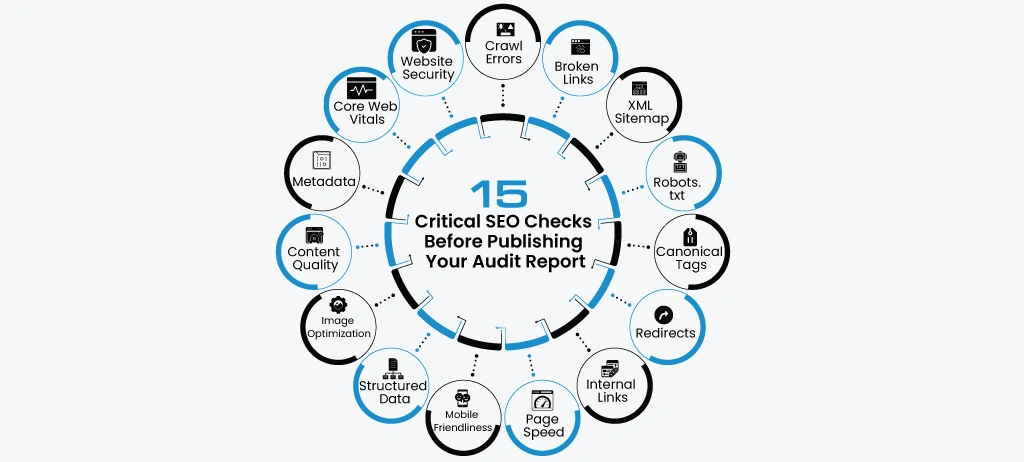
A Website Audit Report is only as valuable as the checklist behind it. Following a structured checklist ensures that every important SEO factor is reviewed systematically, reducing the chances of overlooking issues that could affect your website's search performance.
Rather than checking pages randomly, SEO professionals use a standardized audit checklist to evaluate technical health, content quality, website performance, and user experience. This approach makes the auditing process more organized, easier to repeat, and more effective when monitoring improvements over time.
The checklist below covers the essential SEO elements that should be reviewed during every Website Audit Report. Together, these checks help identify technical errors, improve website accessibility, strengthen content quality, and create a better experience for both users and search engines.
In the following sections, we'll explain each audit checkpoint, why it matters, the common problems to look for, and how addressing these issues contributes to better long-term SEO performance.
1: Crawl errors
Crawl errors occur when search engines attempt to access a page on your website but cannot retrieve it successfully. Since search engines rely on crawling to discover and evaluate your content, unresolved crawl errors can prevent important pages from being indexed and ranked, reducing your website's overall visibility in search results.
For example, imagine you've recently published a high-quality landing page targeting an important keyword. Weeks later, it still isn't receiving any impressions or clicks. During a Website Audit Report, you discover that the page returns a 404 error or a server timeout, preventing search engines from crawling it. Even though the content is valuable, it cannot rank because search engines are unable to access it.
A crawl error doesn't always affect just one page. If important category pages, product pages, or service pages become inaccessible, search engines may stop discovering newly published content linked from those pages. Over time, this can reduce crawl efficiency and weaken your website's organic performance.
When reviewing crawl errors, you should look for:
- Pages returning 404 (Not Found) errors.
- 500-series server errors that prevent pages from loading.
- DNS or hosting connectivity issues.
- Redirect loops and redirect chains.
- Soft 404 pages.
- Blocked URLs that should be crawlable.
- Broken internal links leading to inaccessible pages.
Not every crawl error requires immediate action. For example, a deleted page with no SEO value may not need to be restored. However, crawl errors affecting valuable pages, internal links, or important website sections should be prioritized because they directly influence how efficiently search engines navigate your website.
Regularly monitoring crawl errors also helps identify technical issues introduced after website migrations, CMS updates, or URL changes. Detecting these problems early prevents valuable pages from disappearing from search results and helps maintain a healthy website structure.
Why fixing crawl errors matters
Resolving crawl errors helps search engines:
- Discover new content faster.
- Index important pages correctly.
- Follow internal links more efficiently.
- Improve overall crawl efficiency.
- Maintain accurate search results for your website.
A complete Website Audit Report should always review crawl errors before moving on to content optimization, as technical accessibility forms the foundation of every successful SEO strategy.
2: Broken links
Broken links are hyperlinks that no longer lead to a valid destination. Instead of opening the intended page, they usually return a 404 (Not Found) error or another unavailable page. While a few broken links may seem like a minor issue, they can negatively affect website navigation, user experience, and the efficiency with which search engines crawl your website.
Broken links are commonly introduced after website redesigns, URL changes, content deletions, or migrations. For example, suppose you update the URL of a popular blog post but forget to update the internal links pointing to it. Visitors who click those links will land on an error page instead of the content they expected. Search engines also encounter the same problem, making it harder to crawl your website efficiently.
A Website Audit Report should identify both internal and external broken links:
- Internal broken links point to pages within your website that no longer exist or return an error.
- External broken links point to third-party websites or resources that are no longer available.
Although external broken links don't directly prevent your pages from being indexed, they reduce the overall quality of your content and may weaken user trust. Internal broken links, however, can interrupt your website's navigation, isolate important pages, and waste crawl resources.
During a broken link audit, review the following:
- Internal links returning 404 or 410 status codes.
- Links pointing to redirected or outdated URLs.
- Broken navigation and menu links.
- Links inside blog posts and landing pages.
- Image links that no longer load correctly.
- External references that lead to unavailable resources.
Not every broken link requires the same solution. If the destination page still has SEO value, restoring the page or creating a 301 redirect is often the best approach. If the content has been permanently removed, updating or removing the outdated link provides a better experience for both users and search engines.
Regularly checking for broken links is especially important after website migrations, content updates, or large-scale URL changes. Identifying and resolving these issues helps maintain a healthy internal linking structure, improves crawl efficiency, and ensures visitors can navigate your website without encountering unnecessary errors.
Why fixing broken links matters
Resolving broken links helps you:
- Improve user experience by preventing visitors from landing on error pages.
- Preserve internal link equity across important pages.
- Help search engines crawl your website more efficiently.
- Maintain content quality and website credibility.
- Reduce unnecessary crawl errors identified during an SEO audit.
3: XML Sitemap
An XML Sitemap is a file that helps search engines discover the important pages on your website. It acts as a roadmap by listing the URLs you want search engines to crawl and index. Although search engines can find many pages through internal links, a properly maintained sitemap ensures that valuable content isn't overlooked—especially on large or frequently updated websites.
One of the most common issues identified during a Website Audit Report is an outdated or incomplete XML sitemap. For example, imagine you've published several new service pages and blog articles over the past month, but none of them appear in search results. After reviewing your sitemap, you discover that the newly published URLs were never added. As a result, search engines have fewer signals to discover and crawl those pages, delaying their visibility in search.
A complete XML Sitemap audit should verify:
- All important indexable pages are included.
- Deleted, redirected, or 404 pages have been removed.
- URLs use the preferred canonical version.
- The sitemap is free from duplicate or invalid URLs.
- The sitemap is updated automatically when new pages are published.
- The sitemap has been submitted through Google Search Console.
- Large websites use properly organized sitemap index files where required.
It's equally important to ensure that the sitemap and your website remain consistent. A page listed in the sitemap but blocked by robots.txt, marked with a noindex tag, or redirected to another URL sends mixed signals to search engines. These inconsistencies can reduce crawl efficiency and make it harder for search engines to understand which pages should be indexed.
Many websites also continue to include outdated URLs long after pages have been removed or migrated. Over time, this creates unnecessary crawl requests and makes the sitemap less useful. Regularly reviewing the sitemap helps ensure that it accurately reflects your current website structure.
An XML Sitemap should support your internal linking strategy rather than replace it. Pages that are included in the sitemap should also be accessible through logical internal links, making them easy for both users and search engines to discover.
By keeping your XML Sitemap accurate and up to date, you make it easier for search engines to find new content, revisit existing pages, and maintain a more efficient crawling process—an essential part of any effective Website Audit Report.
Why reviewing your XML Sitemap matters
Keeping your sitemap updated helps you:
- Improve the discovery of newly published pages.
- Remove outdated or invalid URLs from search engine crawls.
- Reduce crawl inefficiencies caused by incorrect URLs.
- Support faster indexing after website updates.
- Maintain a clean and organized website structure.
4: Robots.txt
The robots.txt file is one of the first files search engine crawlers check when they visit your website. It provides instructions about which sections of your website should or shouldn't be crawled. When configured correctly, it helps search engines focus on valuable content while avoiding pages that don't need to appear in search results.
However, a small mistake in the robots.txt file can have significant consequences. For example, imagine your development team updates the file during a website migration and accidentally blocks the entire /blog/ directory. Although the blog posts still exist and visitors can access them, search engines can no longer crawl them. Over time, those pages may stop appearing in search results, leading to a noticeable drop in organic traffic.
This is why reviewing the robots.txt file should always be part of a Website Audit Report.
During a Robots.txt Audit, verify that:
- Important pages and directories are not accidentally blocked.
- Development or staging URLs are excluded from crawling.
- The XML Sitemap location is correctly referenced.
- Unnecessary parameters or duplicate content sections are restricted where appropriate.
- The file follows Google's robots.txt syntax and formatting guidelines.
- Changes made after website updates or migrations haven't introduced crawl restrictions.
It's important to remember that robots.txt controls crawling, not indexing. Blocking a URL in robots.txt doesn't automatically remove it from Google's index. If a page has already been discovered through internal links or external backlinks, it may still appear in search results. For pages that should not appear in search, methods such as the noindex directive or proper redirects are often more appropriate.
Another common issue occurs when businesses block CSS, JavaScript, or image directories without realizing that search engines use these resources to render and understand web pages. Restricting access to essential files can affect how Google interprets your content and evaluates page experience.
Regularly reviewing the robots.txt file becomes even more important after website redesigns, CMS updates, or URL restructuring. A quick configuration change can unintentionally block hundreds of valuable pages, making early detection essential for maintaining search visibility.
Why reviewing robots.txt matters
A properly configured robots.txt file helps you:
- Prevent accidental blocking of important pages.
- Improve crawl efficiency for search engines.
- Guide crawlers toward valuable website content.
- Reduce unnecessary crawling of low-value URLs.
- Support a healthier technical SEO foundation.
5: Canonicals Check
A Canonical Checkverifies whether every important page on your website correctly indicates its preferred version using the canonical tag. Canonical tags help search engines understand which URL should be treated as the primary version when similar or duplicate pages exist. Without proper canonical implementation, search engines may split ranking signals across multiple URLs or index the wrong version of a page.
This issue is more common than many website owners realize. During a Website Audit Report, it's not unusual to find multiple URLs displaying the same content because of URL parameters, pagination, HTTP and HTTPS versions, or trailing slash variations. If these URLs don't point to a single canonical version, search engines may struggle to determine which page should rank.
For example, imagine your product page is accessible through multiple URLs:
- https://example.com/shoes
- https://example.com/shoes/
- https://example.com/shoes?ref=homepage
Although visitors see the same content, search engines may treat these as separate pages if canonical tags aren't implemented correctly. Instead of building authority for one page, ranking signals become fragmented across several URLs, making it harder for the preferred page to perform well.
A canonical check should review the following:
- Whether every indexable page contains a self-referencing canonical tag.
- Canonical tags pointing to the correct preferred URL.
- Pages with missing or multiple canonical tags.
- Canonical tags pointing to redirected, broken, or non-indexable pages.
- Conflicts between canonical tags, XML sitemaps, and internal links.
- Parameter-based URLs that should consolidate to a single page.
- Duplicate pages without a defined canonical version.
One of the most common mistakes is pointing canonical tags to the homepage or another unrelated page. Search engines may ignore these signals if they don't match the page content, leaving duplicate pages eligible for indexing. Similarly, if internal links point to one URL while the canonical tag references another, it creates inconsistent signals that can confuse search engines.
A canonical audit also becomes essential after website migrations or URL restructuring. Changes to URL formats often introduce duplicate versions that remain unnoticed until rankings begin to fluctuate. Regularly reviewing canonical implementation helps ensure search engines consistently index the correct version of every page.
Why checking canonical tags matters
A proper canonical implementation helps you:
- Consolidate ranking signals to a single preferred URL.
- Reduce duplicate content issues.
- Prevent incorrect pages from appearing in search results.
- Improve crawl efficiency by eliminating unnecessary duplicate URLs.
- Strengthen the overall structure of your website.
6: Redirects Checks
A Redirects Check ensures that users and search engines are always directed to the correct version of a webpage. Redirects are commonly used when URLs change because of website migrations, content updates, or page restructuring. When implemented correctly, they preserve the SEO value of the original page and provide a smooth browsing experience. When configured incorrectly, they can slow down crawling, weaken rankings, and create unnecessary technical issues.
For example, imagine you've renamed a service page and changed its URL to make it more descriptive. If the old URL isn't redirected to the new one, anyone visiting the old page—including search engines—will encounter a 404 error. On the other hand, if the page goes through multiple redirects before reaching its final destination, both users and search engines experience slower loading times and reduced crawl efficiency.
A redirects check should review the following:
- Pages returning 301 (Permanent Redirect) where appropriate.
- Temporary 302 redirects that should be updated to permanent redirects.
- Redirect chains involving multiple hops before reaching the final page.
- Redirect loops that prevent pages from loading.
- Broken redirects leading to 404 or unavailable pages.
- HTTP pages correctly redirecting to HTTPS.
- Old URLs redirecting to the most relevant new destination.
One of the most common problems found during a Website Audit Report is the use of redirect chains. For instance, if an old URL redirects to another old URL before reaching the current page, search engines must process multiple requests before accessing the final content. While one redirect is generally acceptable, multiple redirects increase page loading time and reduce crawl efficiency.
Another issue occurs after website migrations. Businesses often redirect all deleted pages to the homepage instead of their closest relevant alternative. Although this prevents visitors from seeing an error page, it creates a poor user experience because the destination doesn't match the user's original intent. Redirects should always point to the most relevant page whenever possible.
Regularly reviewing redirects also helps maintain a clean website architecture. As websites evolve, old redirects can become outdated or unnecessary. Removing invalid redirects and updating incorrect ones keeps navigation efficient and ensures search engines can access your content without unnecessary obstacles.
Why checking redirects matters
Reviewing your redirects helps you:
- Preserve SEO value when URLs change.
- Prevent visitors from landing on broken pages.
- Improve crawl efficiency by eliminating redirect chains.
- Reduce page loading delays caused by unnecessary redirects.
- Ensure search engines index the correct destination pages.
7: Internal links
An Internal Links Check evaluates how effectively your pages are connected throughout your website. Internal links do more than help visitors navigate; they help search engines discover new pages, understand the relationship between topics, and identify which pages are the most important. A strong internal linking structure distributes authority across your website, while a poor one can leave valuable pages isolated and difficult to rank.
One of the most common findings in a Website Audit Report is that important pages receive very few internal links, while less valuable pages receive the majority of the link equity. This imbalance makes it harder for search engines to determine which pages should be prioritized in search results.
For example, imagine you've published a detailed guide targeting a competitive keyword. The content is comprehensive, technically optimized, and fully indexed, but it still struggles to rank. After reviewing your internal linking structure, you discover that the page is linked from only one older blog post. Meanwhile, several high-authority pages on your website discuss related topics but don't link to it. Adding relevant contextual links from these pages strengthens the page's authority and helps both users and search engines discover it more easily.
A complete Internal Links Check should review:
- Pages with very few incoming internal links.
- Orphan pages that have no internal links at all.
- Broken internal links leading to unavailable pages.
- Anchor text relevance and diversity.
- Links pointing to redirected URLs.
- Important pages buried too deep within the website.
- Opportunities to connect related content naturally.
- Consistency in linking between category pages, blogs, and landing pages.
An effective internal linking strategy is not about adding as many links as possible. Each link should guide users to the next relevant resource based on their intent. For example, a page explaining technical SEO should naturally connect readers to related topics such as XML sitemaps, crawl errors, canonical tags, or page speed. This creates a logical content journey while helping search engines understand your website's topical structure.
Internal links should also be reviewed whenever new content is published. Many websites create excellent articles or landing pages but fail to connect them with existing content. As a result, these pages receive little authority despite being valuable. Regularly updating older pages with links to new resources helps distribute link equity more effectively and keeps your content ecosystem connected.
Why checking internal links matters
A well-organized internal linking structure helps you:
- Improve the discovery of important pages by search engines.
- Distribute authority across your website more effectively.
- Reduce orphan pages and weak content connections.
- Help visitors navigate naturally between related topics.
- Strengthen topical authority by connecting relevant content clusters.
- Increase user engagement by encouraging visitors to explore additional pages.
8: Page speed
Page Speed measures how quickly a webpage loads and becomes usable for visitors. It is one of the most important elements of a Website Audit Report because it directly affects user experience, engagement, and overall website performance. If a page loads slowly, visitors are more likely to leave before interacting with your content, regardless of how valuable that content may be.
For example, imagine a user clicks your page from Google expecting to find an answer immediately. Instead, the page takes several seconds to load because of oversized images, unoptimized code, and multiple third-party scripts. Before the content even appears, the user returns to the search results and clicks another website. Over time, this behaviour can reduce user engagement and limit the effectiveness of your SEO efforts.
A page speed audit should evaluate the following:
- Overall page loading time.
- Server response time.
- Largest Contentful Paint (LCP).
- Interaction to Next Paint (INP).
- Cumulative Layout Shift (CLS).
- Image size and compression.
- Render-blocking CSS and JavaScript.
- Browser caching and file compression.
- Unused CSS and JavaScript.
- Third-party scripts affecting performance.
One of the biggest misconceptions is that page speed is only about achieving a perfect score in testing tools. In reality, the goal is to provide a fast, stable, and responsive experience for real users. A page that loads quickly but shifts elements while visitors are trying to interact with it still creates frustration. This is why modern performance audits also review Core Web Vitals, which measure loading speed, responsiveness, and visual stability together.
Large media files are another common issue identified during website audits. Uploading high-resolution images without compression, embedding multiple videos, or installing unnecessary plugins can gradually increase page size and loading time. These issues often go unnoticed until website performance begins affecting user behaviour and organic traffic.
Regularly reviewing page speed helps identify these problems before they impact your visitors. As your website grows, adding new features, content, and tracking scripts can slowly reduce performance. Monitoring speed as part of every Website Audit Report ensures your website continues to deliver a smooth browsing experience while supporting long-term SEO growth.
Why checking page speed matters
Improving page speed helps you:
- Deliver a faster browsing experience across all devices.
- Reduce visitor frustration caused by slow-loading pages.
- Improve engagement by making content available more quickly.
- Support better Core Web Vitals performance.
- Maintain a technically healthy website as new content and features are added.
9: Mobile friendliness
A Mobile Friendliness Audit evaluates how well your website performs and displays on smartphones and tablets. Since the majority of searches now happen on mobile devices, Google primarily uses the mobile version of a website for crawling, indexing, and ranking. If your website doesn't provide a good mobile experience, it may struggle to compete in search results, regardless of how strong the content is.
For example, imagine a potential customer searches for your service on their phone and clicks your website. The text is too small to read, buttons are difficult to tap, images overflow the screen, and users have to zoom in to navigate the page. Instead of continuing, they leave within seconds and choose a competitor whose website is easier to use. This is a common issue identified during a Website Audit Report and one that directly affects user engagement.
A Mobile Friendliness Audit should review:
- Responsive design across different screen sizes.
- Text readability without zooming.
- Proper spacing between buttons and clickable elements.
- Images and videos scaling correctly on mobile devices.
- Mobile page loading speed.
- Navigation and menu usability.
- Pop-ups or interstitials blocking important content.
- Horizontal scrolling caused by layout issues.
- Consistency between desktop and mobile content.
One of the most overlooked issues is hiding important content on mobile devices. Some websites remove sections, FAQs, or navigation elements to simplify the layout, but this can also reduce the information available to both users and search engines. The mobile version should provide the same valuable content while presenting it in a way that is easier to read and interact with.
Another common problem is relying only on desktop testing. A page may appear perfectly functional on a computer but become difficult to use on smaller screens because of oversized tables, fixed-width elements, or touch targets placed too close together. Testing your website on multiple mobile devices helps identify these usability issues before they affect visitors.
A mobile-friendly website isn't only about passing Google's mobile usability checks. It should allow users to complete important actions—such as reading content, filling out forms, contacting your business, or making purchases—without unnecessary frustration. Reviewing mobile usability regularly helps maintain a positive user experience as new content and website features are introduced.
Why checking mobile friendliness matters
Optimizing your website for mobile devices helps you:
- Improve the browsing experience for mobile visitors.
- Make important content easier to read and navigate.
- Reduce usability issues that cause visitors to leave.
- Support Google's mobile-first indexing approach.
- Increase the likelihood of users completing important actions on your website.
10: Structured Data
Structured Data is a standardized format that helps search engines understand the content and purpose of a webpage more accurately. Instead of relying only on visible text, structured data provides additional context about elements such as articles, products, FAQs, reviews, organizations, events, and breadcrumbs. This allows search engines to interpret your content more effectively and, when eligible, display enhanced search results known as rich results.
For example, imagine you've published a detailed blog article with a FAQ section. Without structured data, Google may only display the page title and meta description in search results. After implementing the correct FAQ Schema or Article Schema, the page may become eligible for enhanced search features, making it more informative and easier for users to identify in search results. While structured data doesn't guarantee rich results, it improves the way search engines understand your content.
A structured data audit should review the following:
- Presence of relevant schema markup.
- Schema validity and syntax.
- Missing required properties.
- Invalid or outdated schema types.
- Errors and warnings reported in structured data testing tools.
- Consistency between structured data and visible page content.
- Duplicate or conflicting schema implementations.
- Organization, Article, FAQ, Breadcrumb, Product, and Local Business schema where applicable.
One of the most common issues found during a Website Audit Report is incorrect schema implementation. For instance, a page may contain Article Schema, but essential fields such as the author, publication date, or headline are missing. In other cases, structured data may describe information that doesn't actually appear on the page, causing search engines to ignore the markup.
Structured data should also be updated whenever page content changes. If you add FAQs, reviews, products, or business information, the schema should reflect those updates. Keeping both the visible content and structured data aligned helps search engines process your website more accurately.
Although structured data isn't a direct ranking factor, it supports better search visibility by improving content understanding and increasing eligibility for enhanced search features. As part of a complete Website Audit Report, reviewing structured data helps ensure your website follows current search engine guidelines while providing clear information about every important page.
Why checking structured data matters
Reviewing structured data helps you:
- Improve how search engines understand your content.
- Identify missing or invalid schema markup.
- Increase eligibility for rich search results.
- Ensure structured data matches visible page content.
- Maintain compliance with Google's structured data guidelines.
11: Image optimization
Image Optimization ensures that every image on your website is optimized for speed, accessibility, and search visibility without compromising quality. Images play an important role in user engagement, but if they are too large, poorly named, or missing important attributes, they can slow down your website and reduce its overall SEO performance.
One of the most common findings in a Website Audit Report is oversized images. For example, a business uploads a 5 MB banner image directly from a design file without compressing it. The page looks visually appealing, but it takes much longer to load, especially on mobile devices. Visitors may leave before the page finishes loading, increasing bounce rates and creating a poor user experience.
A complete Image Optimization Audit should review:
- Large image files that increase page load time.
- Appropriate image formats such as WebP, AVIF, JPEG, or PNG.
- Missing or non-descriptive alt text.
- Generic file names like IMG12345.jpg instead of descriptive names.
- Image dimensions that exceed the display size.
- Images that aren't compressed.
- Broken or missing images.
- Lazy loading implementation for below-the-fold images.
Image optimization isn't only about reducing file size. Search engines cannot "see" images the way humans do, so they rely on supporting information such as file names, alt text, and surrounding content to understand what an image represents. Well-written alt text also improves accessibility by helping screen readers describe images to visually impaired users.
Another common issue occurs when the same high-resolution image is used across every device. A desktop-sized image served to mobile users consumes unnecessary bandwidth and slows page loading. Using responsive images and modern image formats helps deliver the correct version based on the visitor's device, improving both speed and usability.
As your website grows, new images are constantly added through blogs, landing pages, product pages, and media libraries. Regular image audits help ensure that these assets continue supporting SEO rather than becoming a performance bottleneck.
Why checking image optimization matters
Optimizing images helps you:
- Improve page loading speed.
- Reduce unnecessary page size.
- Enhance accessibility through descriptive alt text.
- Help search engines better understand visual content.
- Create a faster and smoother browsing experience across all devices.
12: Content quality
Content Quality is one of the most important sections of a Website Audit Report because it determines whether your pages genuinely satisfy user intent and provide value beyond simply targeting keywords. Search engines increasingly prioritize content that is accurate, helpful, original, and created to solve real problems rather than content written solely to rank.
Many websites publish articles regularly but still struggle to gain organic visibility. The reason is often not the quantity of content but its quality. Pages that are outdated, repetitive, too short, or fail to answer users' questions completely are less likely to perform well, even if they are technically optimized.
For example, imagine someone searches for "how to audit a website for SEO." They land on an article that briefly defines the process but doesn't explain the steps, common mistakes, or practical solutions. After a few seconds, they leave and choose another result that provides detailed guidance. This tells search engines that the page may not have fully met the user's expectations.
A content quality audit should review the following:
- Originality and uniqueness of the content.
- Search intent alignment.
- Accuracy and factual correctness.
- Content depth and completeness.
- Readability and logical structure.
- Outdated or obsolete information.
- Duplicate or near-duplicate content.
- Keyword usage and natural placement.
- Opportunities to improve topical coverage.
- Internal linking to related resources.
Content quality isn't measured by word count alone. A long article that repeats the same ideas provides little value, while a well-structured article that answers the user's questions clearly and completely is more likely to earn trust. Every page should have a clear purpose, cover the topic thoroughly, and guide readers toward the information they need without unnecessary repetition.
Another important part of a content audit is identifying pages that no longer provide value. Older articles may contain outdated statistics, broken references, or recommendations that are no longer relevant. Refreshing this content with current information often improves its usefulness for readers and keeps it aligned with today's search expectations.
A strong content quality review also evaluates whether each page demonstrates Experience, Expertise, Authoritativeness, and Trustworthiness (EEAT). Practical examples, credible references, clear explanations, and accurate information help establish confidence for both users and search engines.
Regularly reviewing content quality ensures your website continues to provide relevant, trustworthy, and useful information as your industry evolves. It also helps identify opportunities to expand existing pages instead of creating multiple articles targeting the same topic, reducing the risk of keyword cannibalization.
Why checking content quality matters
Improving content quality helps you:
- Better satisfy user search intent.
- Increase engagement by providing complete and useful information.
- Eliminate thin, duplicate, or outdated content.
- Strengthen topical authority across your website.
- Build long-term trust with both users and search engines.
13: Metadata
Metadata provides search engines and users with a brief summary of what a webpage is about before they even visit it. The two most important metadata elements are the title tag and meta description. Although users don't see them on the page itself, they play a significant role in improving search visibility, click-through rates (CTR), and helping search engines understand the purpose of each page.
One of the most common issues identified during a Website Audit Report is poorly optimized metadata. Pages often have duplicate title tags, missing meta descriptions, titles that are too long or too short, or metadata that doesn't accurately describe the page. These issues can reduce the page's ability to attract clicks, even if it already ranks on the first page of search results.
For example, imagine your page ranks in the top five positions for an important keyword, but its title simply says "Home" or "Services" while the meta description is missing. A competing page with a clear, keyword-focused title and a compelling description is more likely to earn the click, even if it ranks slightly lower. Optimizing metadata helps your page stand out and encourages users to visit your website.
A complete metadata auditshould review the following:
- Unique title tags for every indexable page.
- Descriptive and relevant meta descriptions.
- Appropriate title and description length.
- Natural placement of the primary keyword.
- Duplicate or missing metadata.
- Metadata that accurately reflects the page content.
- Click-worthy titles that match user search intent.
- Metadata consistency across similar page types.
Good metadata should be written for users first, not just search engines. Instead of stuffing keywords into the title, focus on clearly describing what the page offers and why someone should click it. Likewise, a well-written meta description should summarize the page naturally while encouraging users to learn more.
Another important consideration is keeping metadata aligned with the actual page content. If the title promises one thing but the page delivers something different, users are more likely to leave quickly. Maintaining consistency between metadata and on-page content creates a better experience and builds trust with visitors.
Metadata should also be reviewed whenever new pages are published or existing content is updated. As search trends change, refreshing title tags and meta descriptions can improve visibility and help pages maintain strong click-through performance over time.
Why checking metadata matters
Optimizing metadata helps you:
- Improve click-through rates from search results.
- Help search engines understand the purpose of each page.
- Eliminate duplicate or missing metadata.
- Better match user search intent.
- Increase the likelihood of attracting qualified organic visitors.
14: Core Web Vitals Check
Core Web Vitals are Google's user experience metrics that measure how quickly a webpage loads, how responsive it is when users interact with it, and how stable the page remains while loading. Unlike general speed metrics, Core Web Vitals focus on the real experience of visitors, making them an essential part of every Website Audit Report.
Many websites load quickly enough to appear functional but still provide a frustrating experience. For example, a page may display its main content within a few seconds, but when a visitor tries to click a button, the layout suddenly shifts because an image loads late. Instead of clicking the intended button, they accidentally click something else. These seemingly small issues reduce usability and can discourage visitors from continuing their journey.
A Core Web Vitals Audit should evaluate the three primary performance metrics:
- Largest Contentful Paint (LCP): Measures how long it takes for the largest visible content element (such as a hero image or heading) to load. A slow LCP often indicates issues like slow server response times, render-blocking resources, or oversized images.
- Interaction to Next Paint (INP): Measures how quickly a webpage responds after a user interacts with it, such as clicking a button, opening a menu, or submitting a form. A poor INP score usually indicates heavy JavaScript execution or long browser processing tasks that delay user interactions.
- Cumulative Layout Shift (CLS): Measures unexpected layout movements while a page loads. Layout shifts commonly occur when images, advertisements, fonts, or embedded content load without reserved space, causing users to accidentally click the wrong element.
- Total Blocking Time (TBT): Although TBT is not an official Core Web Vitals metric, it is an important diagnostic metric used in Lighthouse and PageSpeed Insights. It measures how long the browser's main thread is blocked by heavy JavaScript tasks, preventing users from interacting with the page. High TBT values often lead to poor INP scores, making it an essential metric for identifying responsiveness issues before they affect real users.
During a Website Audit Report, these metrics should be reviewed for both desktop and mobile devices because performance often differs across platforms. A page that performs well on desktop may still experience poor responsiveness or layout instability on smartphones due to slower network speeds and limited device resources.
One of the most common issues affecting Core Web Vitals is unoptimized media. Large images, videos, third-party widgets, and unnecessary scripts can delay content loading and reduce responsiveness. Similarly, failing to define image dimensions or reserving space for dynamic elements can increase layout shifts, creating a poor browsing experience.
Improving Core Web Vitals is not simply about achieving better scores in performance tools. The objective is to make websites easier to use by ensuring visitors can quickly view content, interact without delays, and navigate pages without unexpected visual changes. Regular monitoring helps identify performance issues before they begin affecting user satisfaction and overall website quality.
Why checking Core Web Vitals matters
Reviewing Core Web Vitals helps you:
- Improve real-world user experience.
- Identify loading and responsiveness issues.
- Reduce unexpected layout shifts.
- Improve website usability across desktop and mobile devices.
- Maintain a technically healthy website as new content and features are added.
15: Security Check
Website security is a critical part of every Website Audit Report because it protects your website, your visitors, and your search visibility. A secure website not only safeguards sensitive information but also builds trust with users and helps maintain a stable online presence. Even a well-optimized website can lose traffic and rankings if security issues are ignored.
For example, imagine a visitor lands on your website, and their browser displays a "Not Secure" warning because your SSL certificate has expired. Most users will leave immediately without interacting with your content. In more serious cases, if malware infects your website, search engines may display security warnings in search results or temporarily remove affected pages from their index until the issue is resolved.
A security audit should review the following:
- HTTPS implementation across the entire website.
- SSL certificate validity and expiration.
- Mixed content issues caused by HTTP resources.
- Security headers such as Content Security Policy (CSP), X-Frame-Options, and HSTS.
- Malware, suspicious files, or unauthorized code injections.
- CMS, theme, and plugin updates.
- Login security and authentication settings.
- Publicly accessible sensitive files or directories.
- Backup and recovery readiness.
One of the most overlooked issues is mixed content, where a secure HTTPS page still loads images, scripts, or stylesheets through HTTP. Although the page technically uses HTTPS, browsers may still show security warnings, reducing user confidence and potentially affecting page functionality.
Security should also be reviewed after every website update, plugin installation, server migration, or CMS upgrade. Small configuration mistakes introduced during these changes can expose vulnerabilities that often remain unnoticed until users or search engines detect them.
A secure website creates confidence for visitors while providing search engines with consistent signals that your website is trustworthy. Regular security audits help identify vulnerabilities early, minimize downtime, and protect both your business and your organic visibility.
Why checking website security matters
A security audit helps you:
- Protect visitors from security risks.
- Maintain user trust and website credibility.
- Prevent malware and unauthorized access.
- Reduce the risk of search engine security warnings.
- Keep your website stable after updates and migrations.
What are the common website audit mistakes to avoid?

Running a website audit is only valuable if the findings lead to meaningful improvements. Many businesses invest time in auditing their websites but still struggle to improve rankings because they focus on collecting data instead of solving the problems that actually affect SEO performance.
One of the biggest mistakes is treating every issue as equally important. A website may contain hundreds of warnings, but not all of them have the same impact. For example, fixing a few missing image alt attributes is useful, but resolving crawl errors, broken redirects, or indexing problems should usually take priority because these issues directly affect how search engines access and understand your website.
Another common mistake is relying on a single SEO tool. Every auditing platform has its own strengths and limitations. Validating important findings with multiple data sources such as Google Search Console, analytics platforms, and technical SEO tools provides a more accurate picture of your website's health.
Many website owners also overlook the business goal behind an audit. Improving technical scores is important, but the primary objective should always be to create a better experience for users while increasing organic visibility and conversions. An audit that only focuses on fixing warnings without considering user intent often delivers limited results.
Common website audit mistakes include:
- Ignoring crawl and indexing issues.
- Focusing on low-impact warnings instead of high-priority problems.
- Publishing audit reports without implementing recommendations.
- Creating duplicate content instead of improving existing pages.
- Overlooking internal linking opportunities.
- Forgetting to audit mobile performance separately.
- Leaving outdated redirects, sitemaps, or canonical tags unchanged after website updates.
- Treating website audits as a one-time activity instead of an ongoing process.
Website audits should also be performed regularly. New content, plugin updates, website redesigns, URL changes, and algorithm updates can introduce new issues over time. Scheduling routine audits helps identify these problems before they begin affecting your organic performance.
The most effective Website Audit Reports don't simply identify issues—they prioritize them, explain their impact, and provide a clear action plan. By focusing on the improvements that matter most, you can build a healthier website that performs better for both users and search engines.
How WRanker Simplifies Website Audit Reporting?
Creating a comprehensive Website Audit Report manually can be time-consuming. Reviewing technical SEO, page performance, metadata, internal links, crawlability, Core Web Vitals, security, and dozens of other factors often requires switching between multiple tools and compiling the findings into a single report. This process becomes even more challenging when auditing large websites or managing multiple projects.
WRanker simplifies this workflow by bringing the most important website audit checks together in one platform. Instead of manually collecting data from different sources, you can identify technical issues, review on-page optimization, analyze website performance, and monitor your site's overall SEO health from a centralized dashboard.
Whether you're auditing a single landing page or an enterprise website, WRanker helps you quickly uncover issues that may affect search visibility, user experience, and website performance. From identifying crawl errors and broken links to reviewing page speed, Core Web Vitals, metadata, internal links, and security-related issues, the platform helps organize your audit process into clear, actionable insights.
One of the biggest advantages of using WRanker is that it doesn't stop at identifying problems. Each report helps prioritize issues based on their impact, making it easier to decide what should be fixed first. This allows SEO professionals, agencies, and website owners to spend less time collecting data and more time improving their websites.
As your website grows, regular audits become essential. WRanker makes ongoing monitoring easier by helping you track changes, validate improvements, and maintain a technically healthy website without relying on multiple disconnected tools.
Continue your website audit with WRanker tools
Depending on the issues identified during your audit, you can continue your analysis using related WRanker tools, including:
- Website SEO Analyzer
- Page Technical Health Checker
- Core Web Vitals Checker
- Page Speed Checker
- Broken Link Checker
- Internal Link Analyzer
- XML Sitemap Checker
- Robots.txt Tester
- Keyword Research Tool
Using these tools together helps create a more complete, accurate, and actionable Website Audit Report, allowing you to identify issues faster and improve your website with greater confidence.
Conclusion
A well-prepared Website Audit Report does more than identify SEO issues; it provides a clear roadmap for improving your website's performance. By regularly reviewing technical SEO, on-page optimization, website structure, performance, and security, you can resolve problems before they affect rankings and user experience. Use a consistent audit process, prioritize high-impact fixes, and monitor your website over time to build stronger search visibility and sustainable organic growth.
Frequently Asked Questions
What is a website audit report?
How often should you perform an SEO website audit?
What should be included in a website audit report?
What's the difference between a website audit and an SEO audit?
Can I generate a free website audit report?
Why is technical SEO important in a website audit?
Which tools help create an SEO auditing report?
What are the most common issues found during a website SEO audit?
Does a website audit improve Google rankings?
What is the first step in auditing a website for SEO?
More Related Blogs: