
Purpose
What this is
Competitor Visibility Comparison helps you measure how your organic visibility compares with competitor domains. Compare share of voice, keyword overlap, ranking distribution, and keyword gaps to identify SEO opportunities.
When to use it
- Compare visibility against competitors.
- Identify keyword overlap and shared rankings.
- Find keyword gaps where competitors outrank you.
- Analyze ranking distribution across position buckets.
- Export competitor comparison data.
Where to find it
- Open SEO Dashboard.
- Select Organic Visibility.
- Open Competitor Visibility Comparison.
- Verify Project, Date Range, Device, and Country.
Use identical filters for every competitor to ensure a fair comparison.
Step-by-step
Open Competitor Comparison
Navigate to SEO Dashboard → Organic Visibility → Competitor Visibility Comparison.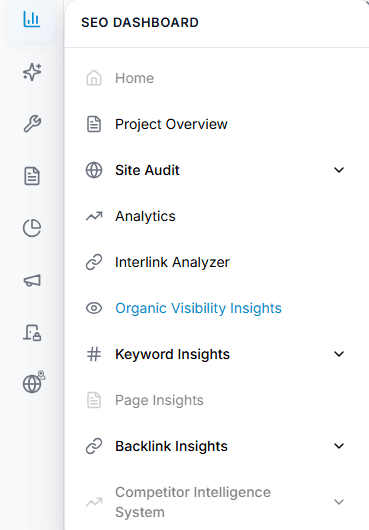
Capture: the Overview chart and the metric cards
Select competitors
Choose one or more competitor domains for comparison.
Capture: the Overview chart and the metric cards
Verify filters
Confirm Project, Date Range, Device, and Country.
Capture: the Overview chart and the metric cards
Review comparison charts
Analyze share of voice, keyword overlap, and ranking distribution.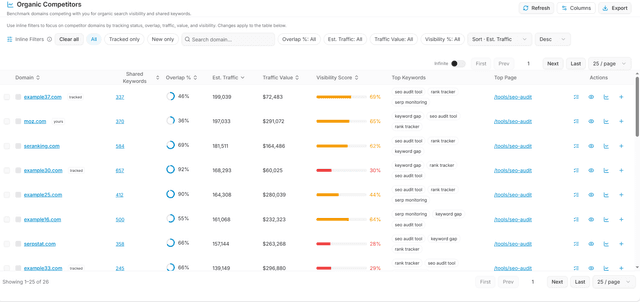
Capture: the Overview chart and the metric cards
Export results
Download comparison data for reporting or further analysis.
Capture: the Overview chart and the metric cards
Key Features
Competitor Selector
Add and manage competitor domains.
Share of Voice
Compare overall organic visibility.
Keyword Overlap
Review shared and unique keywords.
Ranking Distribution
Compare keyword positions across ranking buckets.
Keyword Gap
Discover opportunities competitors rank for.
Export
Download charts and comparison tables.
Tip
Review keyword gaps after comparing share of voice to identify the highest-impact SEO opportunities.
What You'll See
Competitor Selector
Manage comparison domains.
Share of Voice
Overall visibility comparison.
Keyword Overlap
Shared and unique keywords.
Ranking Distribution
Compare ranking strength.
Keyword Gap
SEO opportunities to target.
Export
Download charts and reports.