Internal Link Audit Checklist: Find and Fix Linking Issues

An Internal Link Audit is one of the most overlooked yet impactful SEO activities for improving website crawlability, content discoverability, and search performance. Even high-quality content can struggle to rank if important pages are difficult for search engines and users to find through your website's internal linking structure.
Google recommends using crawlable, descriptive internal links to help search engines discover pages and better understand the relationship between your content. A well-structured internal linking strategy also improves navigation and distributes authority across your website, making it easier for important pages to gain visibility. According to Google's Search documentation, internal links are an essential part of helping Google crawl and interpret your site effectively.
In this guide, you'll learn how to perform a complete internal linking audit, identify common linking issues, apply internal linking SEO best practices, and strengthen your website architecture with actionable recommendations that support long-term organic growth.
Key Takeaways
- Perform an Internal Link Audit regularly to keep your website organized, crawlable, and easy to navigate.
- Identify and fix linking issues such as orphan pages, broken links, redirects, and weak anchor text to improve SEO.
- Build strong content connections by linking related pages and creating topic clusters that improve user experience.
- Review and update internal links whenever you publish new content to maintain a healthy website structure.
- Use an internal link analysis tool to quickly find issues, discover new linking opportunities, and strengthen your overall SEO strategy.
Why Is Internal Linking Important for SEO?

Internal linking plays a key role in helping both users and search engines navigate your website. Every time you connect one relevant page to another, you make it easier for visitors to discover more content while helping search engines understand how your pages are related. That's why a regular Internal Link Audit should be part of every SEO strategy.
A strong internal linking structure also helps distribute authority across your website. Instead of letting valuable pages stand alone, internal links pass relevance to other important pages. This can improve the visibility of pages that deserve more attention in search results.
Internal links also improve the user experience. When readers can easily move from one helpful resource to another, they stay engaged for longer and are more likely to find the information they need. For example, an article about technical SEO can naturally link to topics like website audits, broken links, or XML sitemaps, helping users continue their learning journey.
Another reason for the importance of internal linking is content organization. Linking related pages together creates clear topic clusters, making your website easier to navigate and helping search engines recognize your expertise in a subject. This structure becomes even more valuable as your website grows.
Google also recommends using descriptive, crawlable internal links so search engines can discover and understand your content more effectively. Instead of generic anchor text like "Click Here," use text that clearly describes the destination page. This improves accessibility and provides better context for both users and search engines.
A well-planned internal linking audit helps you identify weak connections, improve page relationships, and uncover new linking opportunities. Over time, this strengthens your website architecture and creates a stronger foundation for long-term SEO growth.
How Internal Links Help Search Engines Understand Your Website

Search engines don't automatically know how every page on your website is connected. They rely on internal links to discover new pages, understand your website structure, and identify which content is most important.
Think of your website as a city and your pages as buildings. Internal links act like roads connecting those buildings. Without those roads, search engines may struggle to reach certain pages, even if they contain valuable content.
For example, imagine you've published a detailed guide on Technical SEO. If that guide links to related articles about XML Sitemaps, Robots.txt checker, Canonical Tags, and Website Audit Reports, search engines can understand that these topics are closely related. This creates a stronger topical relationship between your content and helps build authority around the subject.
This is one of the main reasons why an internal linking audit is important. It helps ensure every important page is connected through relevant links, making your content easier to discover and understand.
How Search Engines Use Internal Links
Every time a search engine crawler visits your website, it follows internal links to find additional pages. The more relevant and organized your linking structure is, the easier it becomes for search engines to explore your website efficiently.
During this process, search engines use internal links to:
- Discover new and updated pages.
- Understand how pages are related.
- Identify your most important content.
- Build topical relationships between articles.
- Decide which pages deserve more crawling attention.
Google also recommends using descriptive anchor text because it provides additional context about the destination page. Instead of using generic phrases like "Click Here," descriptive anchors help both users and search engines understand what to expect after clicking the link.
Example of a Strong Internal Linking Structure
Imagine you've written a pillar article about Technical SEO.
Instead of leaving it as a standalone page, you connect it with related resources like:
- Website Audit Report
- XML Sitemap Guide
- Robots.txt Guide
- Canonical Tags
- Internal Link Audit Checklist
This tells search engines that these pages belong to the same topic cluster.
As a result, they can better understand your website's expertise and how each page supports the broader subject.
How Search Engines Interpret Different Internal Links
| Internal Link Type | How Search Engines Interpret It | SEO Impact |
| Navigation Links | Important website sections | Improves crawlability and site structure |
| Contextual Links | Related content within the page | Builds topical relevance and authority |
| Footer Links | Supporting pages and resources | Helps discover important utility pages |
| Breadcrumb Links | Parent-child page relationships | Improves website hierarchy |
| Related Article Links | Content relationships | Encourages deeper crawling and better content discovery |
Good vs Poor Internal Linking Example
| Good Internal Linking | Poor Internal Linking |
| Uses descriptive anchor text | Uses "Click Here" or generic anchors |
| Links to relevant pages | Links to unrelated content |
| Connects topic clusters | Leaves important pages isolated |
| Helps users continue reading | Ends the user journey abruptly |
| Supports website hierarchy | Creates a confusing site structure |
A well-planned internal link analysis helps you identify whether search engines can easily understand the relationships between your pages. If important content isn't connected logically, it becomes harder for search engines to recognize its relevance within your website.
What Happens When Your Internal Linking Strategy Is Poor?
A poor internal linking strategy can make it difficult for both users and search engines to navigate your website. Even if you publish high-quality content, important pages may struggle to rank because they aren't connected properly.
Over time, these issues can affect your website's visibility, user experience, and overall SEO performance. This is why conducting a regular Internal Link Audit is essential to identify and fix hidden linking problems before they impact your rankings.
Common Problems Caused by Poor Internal Linking
1. Important Pages Become Hard to Find
If a page has few or no internal links pointing to it, search engines may discover it less frequently. This can slow down indexing and reduce the page's chances of appearing in search results.
For example, if you've published a detailed guide on Keyword Research but haven't linked to it from relevant SEO articles, both users and search engines may overlook it.
2. Orphan Pages Lose Organic Visibility
An orphan page is a page that has no internal links pointing to it. Since there are no clear paths leading to it, search engines may not crawl it regularly, even if it's included in your XML sitemap.
A regular internal linking audit helps identify orphan pages and reconnect them to relevant sections of your website.
3. Link Equity Doesn't Reach Important Pages
Some pages naturally earn more authority than others. If that authority isn't shared through relevant internal links, valuable pages may never receive the visibility they deserve.
For example, if your homepage receives the most traffic but doesn't link to important service pages or pillar content, much of its SEO value remains underutilized.
4. Users Leave Your Website Too Soon
Visitors often want to explore related information after reading an article. Without relevant internal links, they may leave your website instead of continuing their journey.
A clear internal linking structure keeps users engaged by guiding them to useful resources, tools, or related articles.
5. Search Engines Struggle to Understand Content Relationships
When related pages aren't connected, search engines have fewer signals to understand how your content fits together.
For example, if your Technical SEO guide doesn't link to articles about Canonical Tags, Robots.txt, or Website Audit Reports, it becomes harder to establish topical relevance across your website.
6. Website Growth Becomes Difficult to Manage
As your website grows, adding new pages without updating existing internal links creates disconnected content.
Over time, this results in inconsistent navigation, missed linking opportunities, and pages that receive little or no internal authority.
Regular internal link analysis helps maintain a scalable website structure as new content is published.
Signs Your Website Needs an Internal Link Audit
The following issues often indicate that your internal linking strategy needs improvement.
| Warning Sign | Possible SEO Impact |
| Orphan pages | Important pages may not be crawled or indexed regularly. |
| Broken internal links | Users and search engines reach error pages instead of useful content. |
| Redirected internal links | Wastes crawl resources and creates unnecessary redirects. |
| Generic anchor text | Provides little context about the linked page. |
| Deep pages | Important content requires too many clicks to access. |
| Weak topic clusters | Reduces topical authority and content relevance. |
| Outdated internal links | Leads users to less relevant or obsolete content. |
By identifying these issues early, you can build a stronger website structure that supports better crawling, indexing, and long-term SEO performance.
How to Perform an Internal Link Audit Step by Step
An Internal Link Audit is a structured process that helps you evaluate how pages are connected across your website. Instead of checking links one by one, you analyze your entire internal linking structure to identify issues that affect discoverability, navigation, and content organization.
The goal isn't to add more internal links everywhere. It's to ensure every important page is connected through relevant, meaningful links that support both users and search engines.
Before you begin, gather the right data about your website. This includes your page URLs, internal link reports, crawl data, and website structure. Having accurate information makes it easier to identify issues and prioritize the pages that need attention first.
For most websites, using an internal link analysis tool can save significant time. These tools automatically crawl your website, map internal connections, and highlight opportunities that are difficult to find manually. They also help you monitor changes as your website grows.
There isn't a single approach that works for every website. A small business website, an eCommerce store, and a large publishing site all have different internal linking structures. That's why your audit should focus on the pages that matter most to your business goals and organic search performance.
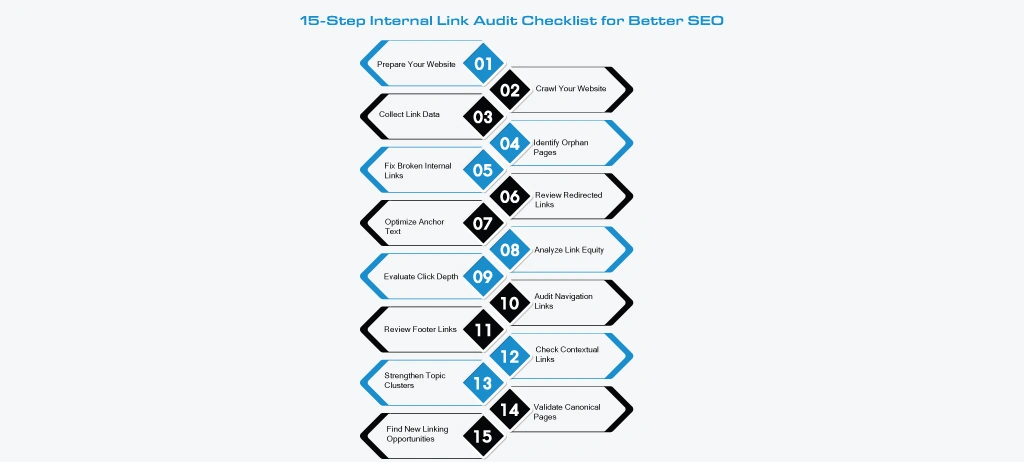
The following 15-step internal linking audit checklist provides a practical workflow that you can use on any website. Follow each step in order to identify linking issues, strengthen your website structure, and create better pathways for both users and search engines.
If you're auditing a large website, start with your highest-value pages such as service pages, category pages, pillar content, and blogs that already receive organic traffic. Improving these pages first often delivers the quickest SEO impact.
Find Internal Linking Issues Before They Affect Your SEO
Run Free Internal Link Analysis Explore Free SEO ToolsStep #1: Prepare Your Website for an Internal Link Audit
Before you start an Internal Link Audit, take a few minutes to prepare your website and gather the information you'll need. A well-organized audit is faster, more accurate, and helps you avoid missing important pages.
Start by defining which part of your website you want to audit. You can review the entire website or focus on specific sections such as your blog, service pages, product categories, or recently published content. If your website is large, auditing one section at a time makes the process easier to manage.
Next, create a list of all important URLs. Your XML sitemap is a good starting point because it usually contains the pages you want search engines to crawl and index. Compare this list with your most valuable landing pages to ensure nothing important is overlooked.
You should also identify the pages that matter most to your business. These may include pages that generate leads, receive the most organic traffic, target competitive keywords, or support your primary products and services. Giving these pages priority helps you focus your audit where it can have the greatest SEO impact.
Finally, choose the tools you'll use during the audit. An internal link analysis tool can quickly collect link data, while additional SEO tools can help verify crawlability, broken links, redirects, and indexability throughout the process.
What Checklist Before You Begin
| Task | Why It Matters |
| Define the audit scope | Keeps the audit focused and organized. |
| Export your XML sitemap | Ensures all important URLs are included. |
| List priority pages | Focuses on pages that drive the most SEO value. |
| Review recent content | Include newly published pages that may need internal links. |
| Select your audit tools | Collect accurate data for the remaining audit steps. |
A successful internal linking audit starts with proper preparation. Defining the audit scope, organizing your important URLs, and selecting the right tools ensures every following step is based on accurate data, making it easier to identify linking opportunities and improve your website structure.
Step #2: Crawl Your Website
Once you've prepared your website, the next step is to crawl it. Crawling helps you discover every accessible page and understand how your website is connected. It's the foundation of an accurate Internal Link Audit because every finding in the later steps depends on the data collected during the crawl.
A website crawler starts from your homepage and follows internal links to discover other pages, just like a search engine crawler. As it moves through your website, it records important information such as page URLs, status codes, internal links, metadata, and page relationships.
For smaller websites, a crawl may take only a few minutes. Larger websites with thousands of pages may require more time, but the process remains the same. The goal is to create a complete snapshot of your website before analyzing individual linking issues.
What Should You Collect During the Crawl?
At this stage, don't focus on fixing problems yet. Instead, collect accurate data that you'll use throughout the remaining audit steps.
| Data to Collect | Why It Matters |
| Crawled URLs | Confirms which pages are discoverable. |
| Internal Links | Shows how pages are connected. |
| HTTP Status Codes | Identifies pages that require further review later. |
| Crawl Depth | Helps measure how far pages are from the homepage. |
| Page Titles & Metadata | Useful for reviewing page structure during the audit. |
A complete website crawl gives you the data needed to perform an effective internal link analysis. Once you've collected accurate crawl reports, you can begin identifying specific issues such as orphan pages, broken links, redirects, and weak internal connections in the following steps.
Step #3: Collect Internal Link Data
After completing the website crawl, the next step is to organize the data you'll use throughout the audit. Collecting the right information makes it easier to identify linking issues and prioritize improvements without reviewing every page manually.
Instead of analyzing reports immediately, create a single source of truth that contains all the important internal linking data. This allows you to compare pages, spot patterns, and track improvements as you move through each step of the Internal Link Audit.
What Internal Link Data Should You Collect?
Most website crawlers and internal link analysis tools provide detailed reports. Focus on collecting the information that will help you evaluate your website's internal linking structure.
| Data | Why You Need It |
| Page URL | Identifies every crawled page. |
| Number of Internal Links | Shows how many links point to and from each page. |
| Anchor Text | Helps review how pages are connected. |
| HTTP Status Code | Confirms the page is accessible. |
| Crawl Depth | Indicates how far a page is from the homepage. |
| Canonical URL | Helps verify the preferred version of each page. |
Example:
Suppose your crawl report contains 800 pages. After organizing the data, you notice that several important service pages have significantly fewer internal links than your blog articles.
At this stage, you don't need to fix the issue. Simply record the finding. You'll investigate why this happened in the upcoming audit steps.
Collecting organized and accurate data is an essential part of every internal linking audit. When your reports are complete and easy to review, you can identify issues faster, make informed decisions, and complete the remaining audit steps more efficiently.
Step #4: Identify Orphan Pages
An orphan page is a page that exists on your website but has no internal links pointing to it. Since no navigation or contextual links are leading to the page, both users and search engines may have difficulty finding it.
Orphan pages often appear after publishing new content, redesigning a website, removing pages, or changing the site structure without updating internal links. While these pages may still be indexed, they usually receive less visibility and fewer opportunities to rank because they are disconnected from the rest of your website.
Finding orphan pages is an important part of any Internal Link Audit because it helps ensure every valuable page is connected through a logical internal linking structure.
How to Find Orphan Pages?
The easiest way to identify orphan pages is by comparing your website crawl with other data sources, such as your XML sitemap or Google Search Console.
If a page appears in your sitemap but isn't discovered during the crawl, it could be an orphan page. Likewise, pages receiving organic traffic but lacking internal links should also be reviewed.
Many internal link analysis tools automatically highlight orphan pages, making them easier to identify without manually comparing reports.
Example:
Imagine you've published a guide called "Technical SEO Checklist." It's included in your XML sitemap, but none of your existing articles link to it.
As a result:
- Visitors are unlikely to discover the guide while browsing your website.
- Search engines have fewer paths to reach the page.
- The guide receives little internal authority from related content.
Adding contextual links from relevant articles such as Website Audit, XML Sitemap, or Robots.txt helps integrate the page into your website's content structure.
Orphan pages reduce the effectiveness of your website's internal linking structure. Identifying and reconnecting valuable pages helps create stronger content relationships, improves navigation, and ensures important pages become part of your overall SEO strategy.
Step #5: Find Broken Internal Links
Broken internal links are links that point to pages that no longer exist or return an error, such as 404 Not Found. When users click these links, they reach a dead end instead of the content they expected. Search engines also treat broken links as a signal that parts of your website may not be properly maintained.
Finding and fixing broken links is an essential step in every Internal Link Audit because it improves navigation, protects the user experience, and ensures search engines can move through your website without unnecessary interruptions.
Why Broken Internal Links Matter
A few broken links may not have a major impact, but as your website grows, they can quickly become a larger problem.
Broken internal links can:
- Frustrate users by leading them to error pages.
- Interrupt the natural flow between related content.
- Reduce the value of your internal linking structure.
- Prevent important pages from being easily accessed.
- Create a poor experience for both visitors and search engines.
Regular internal link analysis helps you identify these issues before they affect your website's performance.
How to Find Broken Internal Links
The easiest way to identify broken internal links is by using an internal linking tool or a website crawler. These tools scan your website and report links that return error status codes.
You can also use Google Search Console to monitor crawl errors and review pages that may contain broken links.
Once you've identified them, review each link to determine whether it should be updated, redirected, or removed.
Common Causes of Broken Internal Links
| Cause | Example |
| Deleted pages | A blog post was removed, but other pages still link to it. |
| URL changes | A page URL changed without updating internal links. |
| Website migration | Links still point to the old website structure. |
| Typing mistakes | Incorrect URLs were added while creating content. |
| Content updates | Older articles still reference outdated pages. |
Example:
Suppose your article "Technical SEO Guide" links to a page about Canonical Tags.
Later, you change the URL of the Canonical Tags page but forget to update the internal link.
Instead of reaching the new page, visitors land on a 404 error page.
Updating the internal link to the correct URL immediately restores the connection and improves the user experience.
Broken internal links weaken your website's navigation and create unnecessary barriers for users. Regularly checking and fixing these links keeps your internal linking structure healthy, improves the browsing experience, and supports a more effective SEO strategy.
Step #6: Review Redirected Internal Links
Not every redirected link is a problem, but linking to redirected URLs isn't considered an internal linking SEO best practice. Every time an internal link points to a redirected page instead of the final destination, it creates an unnecessary step for both users and search engines.
During an Internal Link Audit, review all redirected internal links and update them to point directly to the final URL whenever possible. This helps keep your website structure clean and improves crawling efficiency.
What Are Redirected Internal Links?
A redirected internal link is a link that sends users and search engines to another URL before they reach the final page.
For example:
Current Internal Link
/seo-guide
⬇ Redirects to
/technical-seo-guide
Instead of linking to the old URL, update the internal link to point directly to /technical-seo-guide.
Although users still reach the correct page, removing unnecessary redirects creates a more efficient internal linking structure.
How to Find Redirected Internal Links
Most internal link analysis tools include redirect reports that show internal links pointing to URLs with 301 or 302 status codes.
You can also identify redirected links by crawling your website and filtering URLs that return redirect responses.
Instead of fixing them immediately, review each redirect first to confirm that it still serves a purpose.
Redirect vs Direct Link: What is the Difference?
| Direct Internal Link | Redirected Internal Link |
| Points directly to the destination page | Passes through one or more redirects first |
| Faster for users and crawlers | Adds an unnecessary extra step |
| Easier to maintain | Can become outdated over time |
| Recommended as an SEO best practice | Should be updated whenever possible |
Redirects are useful when URLs change, but your internal links shouldn't rely on them forever. Updating links to point directly to the final page keeps your website easier to crawl, simplifies maintenance, and follows internal linking SEO best practices.
Step #7: Analyze Anchor Text Distribution
Anchor text is the clickable text used in a hyperlink. It tells users what they can expect after clicking a link and gives search engines additional context about the destination page.
During an Internal Link Audit, review the anchor text used across your website to make sure it is clear, relevant, and descriptive. Well-written anchor text improves navigation and helps search engines understand the relationship between your pages.
For example, instead of using a generic phrase like "Click Here," use descriptive anchor text such as "Website Audit Checklist" or "Technical SEO Guide." This gives both users and search engines a better understanding of the linked content.
Why Anchor Text Matters?
Anchor text helps connect related topics across your website. When used naturally, it creates stronger relationships between pages and makes it easier for visitors to discover additional resources.
A balanced anchor text strategy can also support your internal link analysis by highlighting whether important pages are linked consistently throughout your website.
The goal isn't to repeat the same keyword everywhere. Instead, use anchor text that matches the context of the surrounding content.
Review Your Anchor Text Distribution
When reviewing your internal links, look for patterns that may need improvement.
Ask yourself these questions:
- Are the anchor texts descriptive?
- Do multiple links use the exact same anchor text unnecessarily?
- Are important pages linked with meaningful anchor text?
- Are generic phrases used too often?
- Does the anchor text match the destination page?
These simple checks help create a more natural internal linking structure without over-optimizing your content.
Example:
Imagine you have three different articles linking to your Internal Link Audit Checklist.
Instead of using the exact same anchor text every time, you could naturally vary it based on the content.
| Article Topic | Example Anchor Text |
| Technical SEO | Internal Link Audit Checklist |
| Website Audit | Internal Linking Audit Process |
| On-Page SEO | Internal Linking Best Practices |
This variation keeps your content natural while still providing clear context about the linked page.
Anchor text is more than just clickable text; it provides context for both users and search engines. A well-planned internal linking audit should include a review of anchor text to ensure your links are descriptive, relevant, and naturally integrated into the content. Small improvements in anchor text can make your internal linking structure easier to understand and navigate.
Step #8: Measure Internal Link Equity
Internal link equity refers to the value or authority that one page passes to another through internal links. Pages with more authority, such as your homepage or high-performing blog posts, can help strengthen other important pages by linking to them.
As part of an Internal Link Audit, review how authority flows across your website. The goal is to ensure your most valuable pages receive enough internal support instead of relying only on backlinks or external traffic.
For example, if your homepage links to a key service page, that page is more likely to receive authority than another page with no internal links. A balanced internal linking structure helps distribute this value across your website.
Why Internal Link Equity Matters
Not every page on your website has the same level of authority. Some pages naturally earn more traffic, backlinks, or engagement than others.
If those high-value pages don't link to related content, their authority remains concentrated instead of supporting the rest of your website.
A well-planned internal link analysis helps you identify pages that receive plenty of authority and pages that need stronger internal connections.
Which Pages Usually Pass the Most Link Equity?
While every website is different, these pages often have the highest authority.
| High-Authority Page | Why It Matters |
| Homepage | Usually receives the most backlinks and visitors. |
| Service Pages | Target high-value business keywords. |
| Category Pages | Connect multiple related pages. |
| Pillar Content | Covers a topic in depth and links to supporting content. |
| Popular Blog Posts | Often attract backlinks and organic traffic. |
These pages are excellent places to add relevant internal links to other important resources.
Example:
Imagine your Technical SEO Guide receives thousands of monthly visitors and has earned several quality backlinks.
However, your newer articles on Internal Link Audits, XML Sitemaps, and Canonical Tags have very few internal links.
Instead of waiting for those pages to gain authority on their own, add contextual links from the Technical SEO guide to these related resources. This creates a stronger content network and helps users discover more useful information.
A successful Internal Link Audit isn't just about finding issues; it's also about making better use of the authority your website already has. By linking strategically from high-value pages to important content, you create a stronger website structure that supports long-term SEO growth and improves content discovery.
Step #9: Evaluate Click Depth
Click depth refers to the number of clicks it takes to reach a page from your homepage. The fewer clicks required, the easier it is for both users and search engines to discover that page.
As part of an Internal Link Audit, review the click depth of your important pages. Pages buried too deep within your website are often visited less frequently by users and may receive less attention from search engines.
A well-structured website keeps important pages close to the homepage while maintaining a logical navigation structure.
Why Click Depth Matters?
Every additional click makes it slightly harder for visitors to find the information they need. The same applies to search engine crawlers, which follow internal links to discover and understand your content.
For example, if a service page can be reached in two clicks, users are more likely to find it than a similar page that requires six clicks through multiple categories.
Reducing unnecessary click depth creates a smoother browsing experience and makes your website easier to explore.
How to Measure Click Depth?
Most internal link analysis tools calculate click depth automatically during a website crawl.
Review your reports and identify pages that require multiple clicks from the homepage.
Pay special attention to pages such as:
- Service pages
- Product pages
- Category pages
- Pillar content
- High-performing blog posts
- Landing pages
These pages should be easy to access from other relevant sections of your website.
What is the Recommended Click Depth?
Although there isn't a fixed rule, keeping important pages within three to four clicks is considered a good practice for most websites.
| Click Depth | Recommendation |
| 0 Clicks | Homepage |
| 1–2 Clicks | Ideal for high-priority pages |
| 3–4 Clicks | Acceptable for supporting content |
| 5+ Clicks | Review whether the page should be easier to access |
The goal isn't to make every page one click away. Instead, organize your website so users can naturally reach important content without navigating through multiple unnecessary pages.
Example:
Home → SEO Tools → Technical SEO Tools → Website Analysis → Internal Links Checker
The page requires four clicks to reach.
Now consider this structure:
Home → SEO Tools → Internal Links Checker
The page becomes much easier to find while keeping the website organized.
Small improvements like this can make navigation more intuitive for both users and search engines.
Evaluating click depth helps you understand how easily users and search engines can reach your content. During an Internal Link Audit, aim to keep your most valuable pages accessible through a logical website structure. Small improvements to click depth can make navigation simpler, improve content discovery, and create a better overall user experience.
Step #10: Review Navigation Links
Your website's navigation is one of the first places both users and search engines use to explore your content. A well-organized navigation menu makes it easier to discover important pages, while a confusing menu can hide valuable content and create a poor user experience.
During an Internal Link Audit, review your navigation links to ensure they point to your most important pages and reflect your current website structure. As your website grows, it's common for navigation menus to become outdated or include links that no longer provide value.
Why Navigation Links Matter?
Navigation links help define your website hierarchy. They tell visitors where to go next and help search engines understand the relationship between your main sections.
For example, if you offer multiple SEO tools, grouping them under a dedicated SEO Tools menu is much clearer than placing every tool directly in the main navigation.
A clean navigation structure also makes it easier for users to find the pages they're looking for without unnecessary clicks.
What Should You Review?
When reviewing your navigation, focus on the pages that matter most to your audience and business goals.
Check whether your navigation includes:
- Core service or product pages.
- Important category pages.
- High-value SEO tools.
- Resource sections such as Blogs and a knowledge base.
- Contact and support pages.
At the same time, look for outdated or duplicate menu items that may confuse visitors.
Example:
Imagine your website offers more than 40+ SEO tools, but the navigation only displays a few of them without any organization.
Instead, a better structure could look like this:
| Less Organized Navigation | Improved Navigation |
| Home → Tool 1 → Tool 2 → Tool 3 | Home → SEO Tools → Technical SEO, On-Page SEO, Website Audit, Keyword Research |
| Blog listed separately | Resources → Blog, Knowledge Base |
| Random tool order | Tools grouped by category |
This structure makes it easier for users to browse your website while helping search engines understand how your content is organized.
Your navigation menu is the backbone of your website structure. As part of an Internal Link Audit, review it regularly to ensure users can quickly find your most important pages and search engines can clearly understand your website hierarchy. A simple, organized navigation improves usability today and makes it easier to scale your website in the future.
Step #11: Review Footer Links
Footer links are often overlooked during an Internal Link Audit, but they play an important role in helping users and search engines discover important pages. Unlike your main navigation, the footer provides a secondary way to access key resources from anywhere on your website.
A well-structured footer should include links that users commonly look for, such as important categories, support pages, legal documents, and helpful resources. It should make navigation easier without becoming overcrowded with unnecessary links.
Why Footer Links Matter?
Many users scroll to the bottom of a page looking for additional information. A well-organized footer helps them quickly find important pages without returning to the main navigation.
For search engines, footer links provide another path to discover key sections of your website. However, every footer link should serve a clear purpose. Adding dozens of unrelated links can make the footer difficult to use and reduce its overall value.
What Should Your Footer Include?
Your footer should prioritize pages that users frequently need, even if they aren't part of the primary navigation.
Consider including links to:
- SEO Tools
- Blog
- Knowledge Base
- About Us
- Contact Us
- Privacy Policy
- Terms & Conditions
- Refund Policy
- Sitemap
The exact structure will depend on your website, but the goal is to keep the footer simple, useful, and easy to scan.
Example:
Imagine your website offers dozens of SEO tools, educational blogs, and support resources.
Instead of listing every page in the footer, organize related links into clear sections.
| Less Organized Footer | Better Footer Structure |
| Long list of random links | Resources: Blog, Knowledge Base |
| Mixed legal and support pages | Company: About, Contact |
| Duplicate navigation links | Legal: Privacy Policy, Terms & Refund Policy |
| Unorganized tool links | Tools: SEO Tools, Website Audit, Internal Links Checker |
This layout makes the footer easier to navigate while helping users find the information they need faster.
A well-designed footer is more than just the bottom section of your website; it's another opportunity to improve navigation and help users find valuable resources. During an Internal Link Audit, review your footer to ensure it includes relevant links, follows a clear structure, and supports a better browsing experience without unnecessary clutter.
Step #12: Check Contextual Internal Links
Contextual internal links are links placed naturally within the body of your content. Unlike navigation or footer links, these links appear inside paragraphs and guide readers to related pages that provide additional value.
During an Internal Link Audit, review your contextual links to ensure they are relevant, helpful, and placed where users naturally expect more information. Well-placed contextual links improve content discovery, keep visitors engaged, and help search engines understand how your pages relate to one another.
For example, if you're writing about technical SEO, linking to a guide on XML Sitemaps, Canonical Tags, or a Website Audit Tool provides readers with useful next steps without interrupting the reading experience.
Why Contextual Internal Links Matter?
Contextual links connect related topics across your website. They help users continue learning without having to search for the next resource themselves.
From an SEO perspective, contextual links strengthen topical relationships between pages. They also help search engines understand which content supports a broader topic, making your website structure more organized and easier to crawl.
Instead of adding links randomly, every contextual link should answer the reader's next question or provide additional information that naturally fits the discussion.
Where Should You Add Contextual Links?
The best contextual links appear where readers are most likely to need more information.
Common places include:
- Explaining technical SEO concepts.
- Mentioning related SEO tools.
- Referencing step-by-step guides.
- Supporting definitions with detailed articles.
- Connecting beginner guides to advanced resources.
Adding links where they provide genuine value creates a better experience than placing them solely for SEO purposes.
Example:
Imagine you're publishing a guide about Internal Link Audits.
Instead of writing:
"You can use different SEO tools to check your website."
You could naturally write the following:
"Before starting an Internal Link Audit, use a Website Audit Tool to identify technical issues and an Internal Links Checker to review how your pages are connected."
The second example provides readers with relevant next steps while creating meaningful connections between related resources.
Contextual internal links help users discover relevant information without leaving your website. As part of an Internal Link Audit, review these links to ensure they are useful, naturally placed, and connected to related topics. A thoughtful contextual linking strategy improves user engagement, strengthens your content structure, and supports long-term SEO performance.
Step #13: Identify Weak Topic Clusters
A topic cluster is a group of related pages connected through internal links around a central subject. Instead of treating each page as standalone content, topic clusters help users and search engines understand the depth of your expertise on a specific topic.
During an Internal Link Audit, review how your related pages are connected. If supporting articles don't link to each other or to a main pillar page, your website may have weak topic clusters that limit both content discoverability and topical authority.
For example, if you publish multiple articles about technical SEO but they aren't linked together, search engines may struggle to recognize them as part of a comprehensive resource.
Why Topic Clusters Matter?
Google doesn't evaluate pages in isolation. It looks for websites that comprehensively cover a topic and organize related content logically.
A strong topic cluster helps:
- Improve content discovery.
- Strengthen topical authority.
- Help users find related information.
- Make website navigation more intuitive.
- Support a logical internal linking structure.
Instead of creating isolated articles, connect them into a content ecosystem where each page supports the others.
What Does a Strong Topic Cluster Look Like?
Every topic cluster should include:
- One pillar page covering the main topic.
- Supporting articles that explore related subtopics.
- Relevant internal links connecting the pages naturally.
- Clear navigation paths that help users explore additional content.
For example, an SEO website could organize its content like this:
| Pillar Page | Supporting Articles |
| Internal Link Audit | Anchor Text Best Practices |
| Orphan Pages Guide | |
| Broken Internal Links | |
| Website Audit Checklist | |
| Technical SEO Guide |
Each supporting article should link back to the pillar page where relevant, while also linking to closely related resources. This creates a strong network of content that is easier for users and search engines to navigate.
What are the Signs of a Weak Topic Cluster?
| Issue | Impact |
| Supporting articles aren't connected | Users miss related resources. |
| No pillar page exists | The topic lacks a central hub. |
| Inconsistent internal linking | Weakens topical relationships. |
| New articles aren't added to existing clusters | Content becomes isolated over time. |
| Multiple pages target similar intent without linking | Reduces content discoverability and creates a fragmented user journey. |
A successful Internal Link Audit goes beyond checking individual links; it also evaluates how your content works together. Strong topic clusters help users navigate related resources, improve content discoverability, and demonstrate expertise to search engines. By organizing your content around pillar pages and supporting articles, you create a scalable website structure that supports long-term SEO growth.
Step #14: Review Canonical Pages
Canonical pages help search engines understand which version of a page should be treated as the primary version when multiple URLs contain the same or very similar content. During an Internal Link Audit, review your canonical pages to ensure your internal links always point to the preferred URL instead of alternate versions.
Linking directly to the canonical URL creates a cleaner website structure, avoids unnecessary confusion, and helps search engines crawl your content more efficiently.
For example, if both of these URLs exist:
- https://example.com/seo-audit
- https://example.com/seo-audit?source=newsletter
Your internal links should point to the canonical version:
https://example.com/seo-audit
Why Canonical Pages Matter?
Large websites often generate multiple versions of the same page through URL parameters, filters, tracking codes, pagination, or duplicate content.
Without proper canonicalization, search engines may spend time crawling different versions of the same page instead of focusing on the preferred one.
Reviewing canonical pages helps you:
- Consolidate signals to the preferred URL.
- Keep your internal linking structure consistent.
- Reduce unnecessary duplicate URLs.
- Improve crawl efficiency.
- Make website maintenance easier.
Although canonical tags guide search engines, your internal links should reinforce that preference by consistently pointing to the canonical page.
Reviewing canonical pages is an important part of every Internal Link Audit. By ensuring all internal links point to the preferred version of each page, you create a more consistent website structure, improve crawl efficiency, and help search engines better understand your content. A clean canonical strategy also reduces duplicate URL variations and supports long-term SEO performance.
Step #15: Find Internal Linking Opportunities
The final step of an Internal Link Audit is to discover new opportunities to connect your content. Even if your website has no broken links, orphan pages, or redirect issues, you may still be missing valuable internal links that could improve navigation and help users discover more relevant content.
Instead of adding links randomly, look for pages that naturally support one another. Every new internal link should provide additional value, answer the reader's next question, or guide them to the next step in their journey.
Finding these opportunities regularly helps keep your website connected as you publish new pages and expand existing content.
Why Internal Linking Opportunities Matter
Every new article, landing page, or SEO tool creates an opportunity to strengthen your website's internal linking structure.
Without regular updates, older pages may never link to newer content, causing valuable resources to receive less visibility than they deserve.
Adding relevant internal links helps you:
- Improve content discovery.
- Keep older content up to date.
- Strengthen topical authority.
- Increase user engagement.
- Support a scalable internal linking strategy.
A strong website continues building new internal connections as it grows.
Example:
Suppose you've just published an article about Internal Link Audits.
Several older articles already discuss related topics, including:
- Technical SEO
- Website Audit Reports
- XML Sitemaps
- Canonical Tags
- Broken Links
Instead of waiting for readers to discover the new article, update those existing pages with relevant contextual links pointing to the Internal Link Audit guide. At the same time, add links from the new guide back to those supporting resources.
This creates a stronger content network where readers can easily move between related topics.
Instead of existing as standalone pages, each resource supports the others through relevant internal links. This creates a better experience for readers while helping search engines understand your website's content hierarchy.
How WRanker's Internal Link Analysis Tool Simplifies SEO Audits
After completing an Internal Link Audit, the next challenge is maintaining a healthy internal linking structure as your website grows. New pages are published, older content gets updated, and important resources can easily become disconnected if your internal links aren't reviewed regularly.
Instead of checking every page manually, an internal link analysis tool helps you monitor your website's internal linking structure from one place. It makes it easier to identify pages with few internal links, discover orphan pages, review anchor text usage, and uncover new linking opportunities between related content.
An internal link audit becomes even more effective when combined with other SEO activities. For example, after identifying linking issues, you can review your website's overall health with a Website Audit, analyze technical issues through a Technical SEO review, and improve individual pages using On-Page SEO best practices. Together, these activities help build a stronger and more organized website.
As your content library grows, it's also important to review supporting elements such as XML Sitemaps, Broken Links, Canonical Tags, and Page Indexability. These factors work alongside internal linking to help search engines crawl, understand, and prioritize your content more efficiently.
The goal isn't simply to add more internal links; it's to create meaningful connections between related pages that improve navigation, support topical authority, and help users discover valuable content. Reviewing your internal linking strategy on a regular basis ensures your website remains easy to explore for both visitors and search engines.
Ready to Audit Your Internal Links?
Start Your Free Internal Link AuditConclusion
A successful Internal Link Audit is an ongoing process that keeps your website organized, easy to navigate, and optimized for search engines. Consistently improving your internal linking strategy supports better user experience, stronger rankings, and sustainable organic growth.
Frequently Asked Questions
What is an Internal Link Audit?
Why is an Internal Link Audit important for SEO?
How often should I perform an Internal Link Audit?
What are the most common internal linking issues?
How many internal links should a page have?
What is the difference between internal links and external links?
How do I identify orphan pages on my website?
Can too many internal links affect SEO?
Which pages should receive the most internal links?
What is the best tool for performing an Internal Link Audit?
More Related Blogs: