
Summary
What this is
The Structured Data tab helps you monitor schema markup detected across your website. It highlights schema types, validation issues, missing properties, and markup problems that may impact search appearance and rich result eligibility.
What you can do
- Review structured data detected across website pages.
- Identify invalid, missing, or incomplete schema properties.
- Filter schema issues by status and type.
- Review affected URLs and recommendations.
- Create tasks for schema implementation fixes.
- Verify improvements after running new audits.
Structured Data results are generated from Site Audit findings. Run a new audit after schema changes to refresh the report.
Prerequisites
Before using Structured Data
- A Wranker project is connected to a domain.
- A Site Audit has been completed for the selected project.
- You have access permissions for the Site Audit module.
- You have Create Task permission if assigning fixes.
Resolve structured data errors before improving optional schema enhancements.
Where to find it
- Open SEO Dashboard.
- Select Site Audit.
- Open Structured Data from the Tab Index.
Confirm the navigation path: SEO → Site Audit → Structured Data
Step-by-step: Review structured data issues
Open Site Audit
Open the Site Audit module for the website you want to analyse.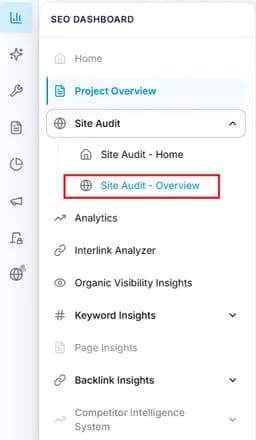
Capture: check connecion
Open Structured Data
Navigate to SEO Dashboard → Site Audit → Structured Data.
Capture: check connecion
Review schema results
Review detected schema types, validation status, and affected URLs.
Capture: check connecion
Filter structured data issues
Use filters to view Errors, Warnings, Valid items, schema types, or specific URLs.Review issue details
Open a result to view missing properties, invalid fields, and recommended fixes.Create schema tasks
Assign schema improvements to developers or team members.Verify fixes
Run another Site Audit and confirm structured data issues are resolved.
Expected result
- Structured data issues are identified across website pages.
- Schema errors and warnings are easier to prioritise.
- Development teams receive clear implementation tasks.
- Schema improvements can be monitored after updates.
Key Features
Fix schema Errors first because invalid markup can prevent pages from qualifying for enhanced search results.
What You'll See
Common workflows
Fix structured data errors
Filter errors
View pages containing structured data errors.Review affected pages
Open URLs and inspect missing or invalid properties.Apply schema fixes
Update markup implementation based on recommendations.
Improve schema quality
Review warnings
Identify optional improvements and missing enhancements.Update schema
Improve markup completeness and consistency.Validate changes
Run a new audit to confirm improvements.
Tips and best practices
- Fix Errors before Warnings.
- Keep schema implementation consistent across templates.
- Review important pages after schema changes.
- Run Site Audit after deployments.
- Follow structured data guidelines when implementing changes.
Do not ignore structured data errors. They can affect eligibility for rich search results.