
Summary
What this is
The Coverage Report helps you monitor how Google Search Console categorises your website pages. It shows whether URLs are Valid, have Warnings, contain Errors, or are Excluded.
What you can do
- Review indexed and non-indexed page status from Google Search Console.
- Filter pages by Valid, Warning, Error, and Excluded status.
- Investigate URL-level coverage reasons using details.
- Export coverage data for reporting when available.
Prerequisites
Before using Coverage Report
- A Wranker project exists and is connected to a domain.
- Google Search Console integration is connected for the project.
- You have access to the Site Audit module.
Google Search Console requirement
Coverage data comes from Google Search Console. Without a connected GSC integration, indexing information cannot be displayed.
Purpose
What this is
The Coverage Report shows how Google Search Console categorises pages on your website. It helps you understand indexed pages and pages requiring investigation.
When to use it
- When important pages are not appearing in Google search results.
- After technical changes like redirects, robots.txt, canonical, or noindex updates.
- When monitoring indexed versus non-indexed pages.
- When identifying URLs requiring indexing fixes.
Where to find it in Wranker
- Open SEO Dashboard.
- Select Site Audit.
- Open Coverage from the Tab Index card.
- Confirm the correct project is selected.
Step-by-step: Review Coverage Report
Open Site Audit
Open the Site Audit module for the website you want to monitor.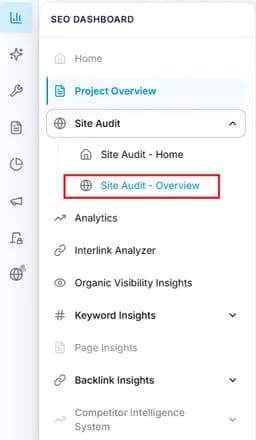
Capture: open site audit
Open Coverage Report
Select Coverage from the Site Audit Tab Index or navigation.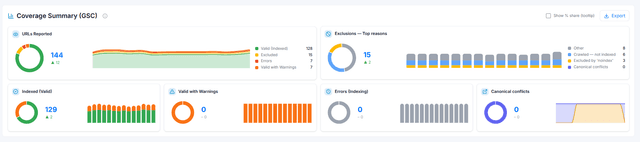
Capture: open coverage report
Confirm Google Search Console connection
Ensure GSC is connected because Coverage data depends on Google Search Console.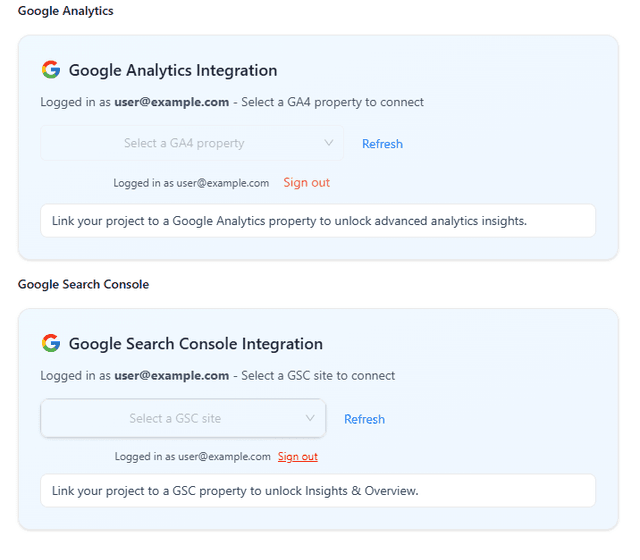
Capture: check connecion
Review coverage status
Review pages grouped by Valid, Warning, Error, and Excluded status.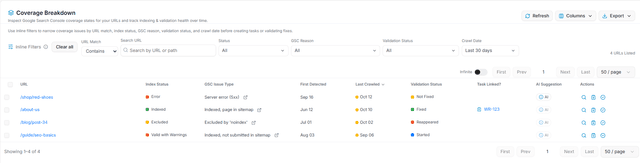
Capture: review coverage status
Investigate URLs
Open URL details to understand coverage reasons and recommended actions.
Key Features
Coverage Status
View Valid, Warning, Error, and Excluded page categories.
Status Filters
Filter URLs based on indexing status.
URL Search
Find specific pages quickly.
Details Drawer
View coverage reasons and recommended fixes.
Export
Export coverage data when available.
Project Selection
Switch between available website projects.
Review Error pages first because they usually require immediate attention.
What you’ll see
Coverage Charts
Shows indexed and non-indexed page status.
Pages Table
Lists URLs with their coverage status.
Status Filters
Filter pages by Valid, Warning, Error, and Excluded.
Search
Search URLs quickly.
Details Drawer
Shows coverage reason and recommendations.
Export
Download coverage information when available.
Common Workflows
Review indexing health
- Review coverage charts.
- Check Error and Warning pages.
- Investigate affected URLs.
- Apply recommended fixes.
Verify fixes
- Implement technical changes.
- Run another audit.
- Compare coverage improvements.
Tips and Best Practices
- Prioritise Error pages before Warning and Excluded pages.
- Confirm excluded pages are intentionally excluded before changing them.
- Use URL search for important business pages.
- Monitor indexing health regularly.
Avoid this mistake
Not every Excluded page is an issue. Many pages are intentionally excluded from indexing.