
Summary
What this is
Internal Links Analysis helps you understand how internal links are distributed across your website. It identifies broken links, orphan pages, weak internal linking areas, and opportunities to improve link equity flow.
What you can do
- Identify broken internal links affecting navigation.
- Find orphan pages without internal link support.
- Analyse incoming and outgoing link distribution.
- Review anchor text usage patterns.
- Improve internal linking structure.
- Create tasks for link improvement work.
- Track improvements after future audits.
Internal Links Analysis depends on Site Audit crawl data. If the crawl is incomplete, some pages or links may not appear.
Prerequisites
Before using Internal Links Analysis
- A Wranker project is connected to a domain.
- A Site Audit has been completed.
- You have access to the Site Audit module.
- Internal linking crawl data is available.
- You have Create Task permission if assigning fixes.
Review broken links and orphan pages first because they can directly impact navigation and crawlability.
Where to find it
- Open SEO Dashboard.
- Select Site Audit.
- Open Internal Links from the Tab Index.
Confirm the navigation path: SEO → Site Audit → Internal Links
Step-by-step: Analyse internal links
Open Site Audit
Open the Site Audit module for the website you want to analyse.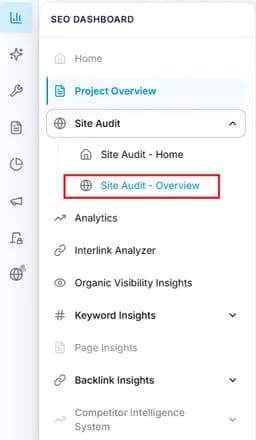
Capture: check connecion
Open Internal Links
Navigate to SEO Dashboard → Site Audit → Internal Links.
Capture: Internal Links
Review link issues
Identify broken links, orphan pages, insufficient links, and excessive linking issues.
Capture: link issue
Use filters and search
Filter results by issue type, URL, or anchor text patterns.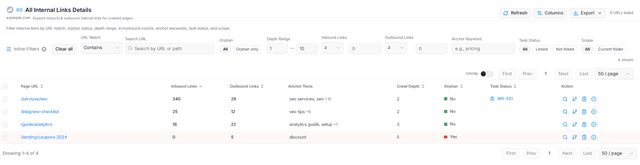
Capture: link issue
Review page details
Open page details to analyse incoming links, outgoing links, and anchor information.Create improvement tasks
Assign internal linking fixes to developers or content teams.Verify improvements
Run another Site Audit after updates and confirm improvements.
Expected result
- Broken internal links are identified and fixed.
- Important pages receive stronger internal link support.
- Orphan pages become connected through relevant links.
- Anchor text becomes clearer and more descriptive.
- Internal linking improvements can be monitored over time.
Key Features
Prioritise important SEO pages when improving internal linking so link equity flows toward valuable pages.
What you'll see
Common workflows
Fix broken and orphan pages
Filter affected pages
Find pages marked as Broken or Orphan.Review links
Check incoming and outgoing internal links.Apply fixes
Repair broken links or add relevant internal links.
Improve link equity distribution
Find weak pages
Identify pages receiving limited internal links.Add contextual links
Create relevant links from related pages.Verify changes
Run a new audit to confirm improvements.
Tips and best practices
- Fix broken links before creating new internal links.
- Prioritise important SEO pages.
- Use descriptive anchor text.
- Avoid excessive internal linking.
- Review internal links after major website changes.
- Run audits regularly to monitor improvements.
Do not add internal links only for SEO. Links should also improve user navigation and provide meaningful context.