
Summary
What this is
Crawl Stats helps you understand how search engines interact with your website. It provides insights into crawl requests, response times, and crawl errors so you can identify issues affecting crawl efficiency.
What you can do
- Monitor crawl requests and crawl activity trends.
- Identify slow responses, timeouts, and crawl-related errors.
- Analyse anomalies using status code and performance filters.
- Investigate affected URLs using page-level details.
- Export crawl data for reporting and team collaboration.
Crawl Stats depends on Site Audit crawl data. If crawl coverage is incomplete or required data sources are unavailable, some crawl activity and anomaly information may not appear.
Prerequisites
Before using Crawl Stats
- A Wranker project exists for the website you want to review.
- A Site Audit has been completed for the selected project.
- You have access to the Site Audit module.
- Required crawl data sources are available for your setup.
- Export permission is available if downloading crawl statistics.
Review crawl coverage before analysing trends so your findings are based on complete audit data.
Where to find it
- Open SEO Dashboard.
- Select Site Audit.
- Open Crawl Stats from the Tab Index or Site Audit navigation.
- Choose the correct project and reporting period.
Confirm the navigation path: SEO → Site Audit → Crawl Stats
Step-by-step: Review Crawl Stats
Open Site Audit
Open the Site Audit module for the website you want to analyse.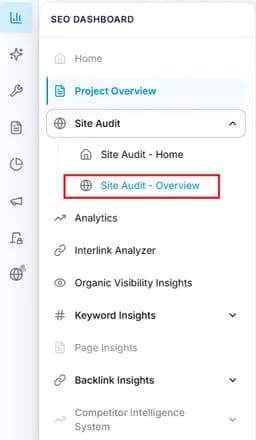
Capture: check connecion
Open Crawl Stats
Navigate to SEO Dashboard → Site Audit → Crawl Stats from the navigation or Tab Index.
Capture: check connecion
Confirm project and reporting period
Verify the selected website and reporting period before reviewing crawl trends.Review crawl activity
Analyse crawl request charts to identify increases, decreases, or unusual crawl behaviour.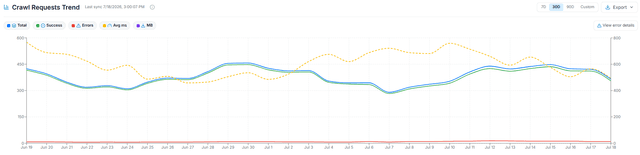
Capture: check connecion
Analyse response times and errors
Review response time trends, timeouts, and 4xx/5xx errors that may affect crawl efficiency.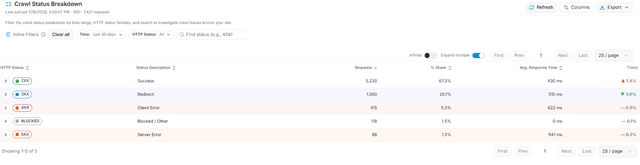
Capture: check connecion
Investigate anomalies
Open anomaly records and use filters to review affected URLs, response times, and crawl sources.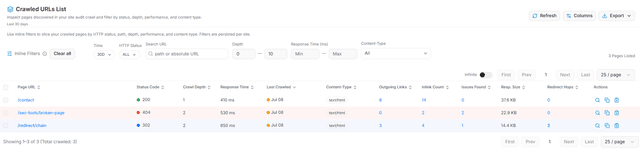
Capture: check connecion
Export crawl data
Download Crawl Stats as CSV when available for reporting and collaboration with technical teams.
Capture: check connecion
Expected result
- Crawl activity trends are clearly understood for the selected project.
- Slow responses, crawl errors, and anomalies are identified.
- Problematic URLs are prioritised for investigation and fixes.
- Crawl findings can be shared with technical teams using exported reports.
Key Features
Review crawl request trends together with response times and crawl errors to identify the root cause of crawling problems.
What you'll see
Common workflows
Diagnose server performance issues
Filter performance issues
Use filters to identify URLs with slow response times, timeouts, or 5xx server errors.Review affected URLs
Open page details to investigate repeated performance problems.Share findings
Provide crawl insights to development or operations teams for resolution.
Investigate crawl budget issues
Review crawl trends
Analyse crawl request charts to identify unusual increases or decreases in crawl activity.Identify crawl waste
Look for repeated redirects, error responses, or unnecessary URL patterns.Prioritise important pages
Ensure valuable pages remain accessible and efficiently crawled.
Analyse crawl anomalies
Apply filters
Filter anomaly records by issue type, response time, or status code.Review affected URLs
Investigate URLs showing crawl errors or unusual activity.Inspect page details
Open the details drawer to understand the cause of crawl issues.
Export crawl reports
Confirm project
Verify the correct website and reporting period are selected.Apply filters
Narrow the report to the required crawl issues if needed.Export data
Download crawl statistics as CSV for reporting or further analysis.
Tips and best practices
- Review Crawl Stats regularly to detect server issues early.
- Compare the same reporting period when analysing crawl trends.
- Prioritise investigating 5xx errors and timeouts before minor crawl issues.
- Use filters gradually to isolate the cause of crawl anomalies.
- Export reports before and after major website releases to measure impact.
- Include the project scope and reporting period when sharing crawl findings.
Don't investigate individual URLs without first checking whether the issue is part of a larger crawl pattern. Always review overall crawl trends before focusing on page-level problems.